The Problem: Debugging Distributed Systems
I’ll never forget the day our checkout service started timing out randomly. The logs showed nothing unusual. Each individual service reported healthy. Yet customers were experiencing 30-second delays at checkout, and we had no idea why.
This is the nightmare of microservices: when a request flows through 8 different services, each with its own database, cache, and external API calls, how do you figure out where the slowdown is happening?
Traditional logging tells you what happened in each service, but it can’t tell you the story of a single request as it travels through your entire system. That’s where distributed tracing comes in.
What is Distributed Tracing?
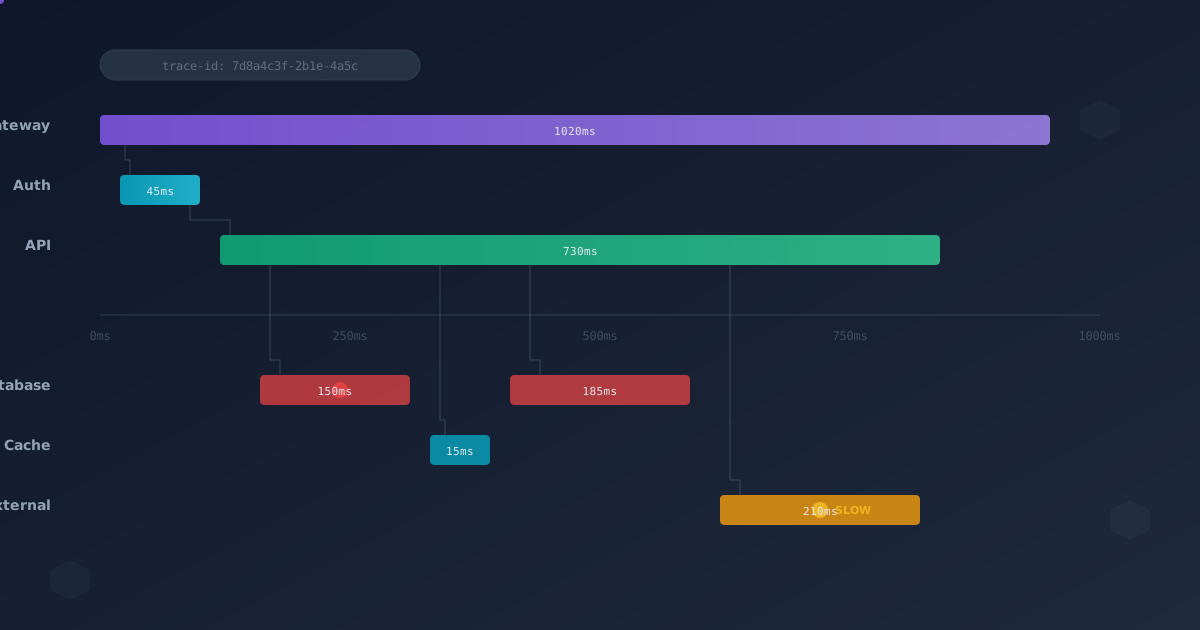
Distributed tracing tracks a single request as it flows through multiple services in your system. Instead of piecing together disconnected logs, you see a complete timeline:
User Request → API Gateway → Auth Service → Order Service → Payment Service → Inventory Service
                 12ms          45ms          230ms            890ms           15ms
Suddenly, the problem is obvious: Payment Service is taking 890ms. But why?
A trace breaks down into spans. Each span represents a unit of work:
- API Gateway receiving request (span 1)
- Auth Service validating token (span 2)
- Order Service creating order (span 3)
- Database INSERT (span 3a)
- Inventory check (span 3b)
- Payment Service processing payment (span 4)
- Call Stripe API (span 4a)
- Update database (span 4b)
Each span records:
- Start time and duration
- Service name and operation
- Tags/attributes (user_id, order_amount, etc.)
- Parent span (building the request tree)
The Anatomy of a Trace
Here’s what a real trace looks like in our system:
Trace ID: 7d8a4c3f-2b1e-4a5c-9d3e-1f2a3b4c5d6e
Total Duration: 1.2s

├─ [API Gateway] POST /checkout                    1200ms
│  ├─ [Auth Service] verify_token                   45ms
│  ├─ [Order Service] create_order                 230ms
│  │  ├─ [PostgreSQL] INSERT into orders            12ms
│  │  ├─ [Redis] GET inventory:item-123              3ms
│  │  └─ [Inventory Service] reserve_items         215ms
│  │     ├─ [PostgreSQL] UPDATE inventory          210ms ⚠️ SLOW
│  │     └─ [Redis] SET reservation:xyz              5ms
│  ├─ [Payment Service] charge_customer            890ms
│  │  ├─ [Stripe API] create_payment_intent        850ms ⚠️ SLOW
│  │  └─ [PostgreSQL] INSERT into payments          40ms
│  └─ [Notification Service] send_confirmation      35ms
│     └─ [SES] send_email                           32ms
The ⚠️ SLOW markers immediately show where to focus: Inventory Service database query and Stripe API call.
The Three Pillars of Observability
Before diving deeper into tracing, it’s important to understand how it fits with other observability tools:
Metrics
- What: Aggregated numbers over time
- When: Monitoring trends, alerts
- Example: “API latency p99 is 500ms”
Logs
- What: Discrete events with context
- When: Debugging specific issues
- Example: “User 123 failed login at 10:23:45”
Traces
- What: Request lifecycle across services
- When: Understanding system behavior
- Example: “Checkout request took 1.2s, 850ms in Stripe”
You need all three. Metrics alert you to problems. Traces help you understand the problem. Logs provide deep context.
Implementing Distributed Tracing
The OpenTelemetry Standard
OpenTelemetry (OTel) is the CNCF standard for instrumentation. It provides:
- APIs for instrumenting your code
- SDKs for different languages
- Exporters to send data to various backends
Here’s how to add tracing to a Node.js service:
// tracer.js
const { NodeTracerProvider } = require('@opentelemetry/sdk-trace-node');
const { JaegerExporter } = require('@opentelemetry/exporter-jaeger');
const { Resource } = require('@opentelemetry/resources');
const { SemanticResourceAttributes } = require('@opentelemetry/semantic-conventions');
const { registerInstrumentations } = require('@opentelemetry/instrumentation');
const { HttpInstrumentation } = require('@opentelemetry/instrumentation-http');
const { ExpressInstrumentation } = require('@opentelemetry/instrumentation-express');

const provider = new NodeTracerProvider({
  resource: new Resource({
    [SemanticResourceAttributes.SERVICE_NAME]: 'order-service',
    [SemanticResourceAttributes.SERVICE_VERSION]: '1.2.3',
  }),
});

const exporter = new JaegerExporter({
  endpoint: 'http://jaeger-collector:14268/api/traces',
});

provider.addSpanProcessor(new BatchSpanProcessor(exporter));
provider.register();

// Auto-instrument HTTP and Express
registerInstrumentations({
  instrumentations: [
    new HttpInstrumentation(),
    new ExpressInstrumentation(),
  ],
});

module.exports = provider.getTracer('order-service');
This gives you automatic tracing for HTTP requests and Express routes. But you’ll want to add custom spans:
const tracer = require('./tracer');

async function createOrder(userId, items) {
  const span = tracer.startSpan('create_order', {
    attributes: {
      'user.id': userId,
      'order.item_count': items.length,
    },
  });

  try {
    // Database operation
    const dbSpan = tracer.startSpan('db.insert_order', {
      parent: span,
      attributes: {
        'db.system': 'postgresql',
        'db.statement': 'INSERT INTO orders...',
      },
    });

    const order = await db.orders.insert({ userId, items });
    dbSpan.end();

    // Call inventory service
    const inventorySpan = tracer.startSpan('inventory.reserve_items', {
      parent: span,
    });

    await inventoryClient.reserve(order.id, items);
    inventorySpan.end();

    span.setAttribute('order.id', order.id);
    span.setStatus({ code: SpanStatusCode.OK });

    return order;
  } catch (error) {
    span.recordException(error);
    span.setStatus({
      code: SpanStatusCode.ERROR,
      message: error.message,
    });
    throw error;
  } finally {
    span.end();
  }
}
Propagating Context
The magic of distributed tracing is context propagation. When Service A calls Service B, it must pass trace context in the request headers:
traceparent: 00-7d8a4c3f2b1e4a5c9d3e1f2a3b4c5d6e-9d3e1f2a3b4c5d6e-01
            │  │                              │              │
            │  └─ Trace ID                    │              └─ Flags
            └─ Version                        └─ Span ID
OpenTelemetry handles this automatically for HTTP clients. For message queues, you need to propagate manually:
const { propagation, context } = require('@opentelemetry/api');

// Publishing a message
async function publishEvent(event) {
  const carrier = {};

  // Inject current trace context into carrier
  propagation.inject(context.active(), carrier);

  await rabbitMQ.publish('orders', {
    ...event,
    traceContext: carrier,
  });
}

// Consuming a message
async function handleMessage(message) {
  // Extract trace context from message
  const ctx = propagation.extract(context.active(), message.traceContext);

  // Continue the trace
  context.with(ctx, () => {
    const span = tracer.startSpan('process_order_event');
    // ... handle message
    span.end();
  });
}
Choosing a Tracing Backend
You need somewhere to send, store, and visualize your traces. Popular options:
Jaeger (Self-Hosted)
Pros:
- Open source, free
- Excellent UI
- Kubernetes-native
- Low operational overhead
Cons:
- You manage storage (Elasticsearch, Cassandra)
- Scaling requires work
- No built-in alerting
We run Jaeger on Kubernetes:
apiVersion: apps/v1
kind: Deployment
metadata:
  name: jaeger
spec:
  template:
    spec:
      containers:
      - name: jaeger
        image: jaegertracing/all-in-one:1.51
        env:
        - name: COLLECTOR_OTLP_ENABLED
          value: "true"
        - name: SPAN_STORAGE_TYPE
          value: elasticsearch
        - name: ES_SERVER_URLS
          value: http://elasticsearch:9200
        ports:
        - containerPort: 16686  # UI
        - containerPort: 14268  # Jaeger collector
        - containerPort: 4317   # OTLP gRPC
        - containerPort: 4318   # OTLP HTTP
Tempo (Self-Hosted)
Grafana Tempo is designed for high-scale tracing:
Pros:
- Cost-effective storage (object storage)
- Integrates with Grafana
- Scales easily
- No indexing overhead
Cons:
- Requires Grafana for visualization
- Less mature than Jaeger
- Query capabilities limited without exemplars
Commercial Options
- Honeycomb - Best-in-class querying and analysis
- Datadog - All-in-one observability platform
- New Relic - Easy setup, great UX
- Lightstep - Built by Dapper creators
We chose Jaeger for cost reasons and Kubernetes integration, but commercial options are worth it if you have budget.
Real-World Troubleshooting Scenarios
Scenario 1: The Mysterious Timeout
Problem: Checkout times out after 30 seconds, but only for 5% of requests.
Investigation:
- Filter traces by operation:
POST /checkout - Filter by duration:
> 30s - Examine slow traces
Finding: These traces all call Payment Service, which calls Stripe API. Stripe spans show 29+ second duration.
Root cause: Stripe API occasionally times out. Our payment service had no timeout configured, so it waited indefinitely.
Solution: Add 10-second timeout to Stripe API client.
const stripe = new Stripe(apiKey, {
  timeout: 10000, // 10 seconds
  maxNetworkRetries: 2,
});
Scenario 2: The Database N+1 Query
Problem: Product listing page is slow for large categories.
Investigation:
- Find slow traces for
GET /products - Examine database spans
Finding: For each product, we make a separate query to fetch category details:
GET /products?category=electronics
├─ SELECT * FROM products WHERE category = 'electronics'   15ms
├─ SELECT * FROM categories WHERE id = 1                    2ms
├─ SELECT * FROM categories WHERE id = 1                    2ms
├─ SELECT * FROM categories WHERE id = 1                    2ms
... (repeated 200 times)
Classic N+1 query problem.
Solution: Add JOIN to product query or use DataLoader pattern.
// Before: N+1 queries
const products = await db.products.findAll({ category });
for (const product of products) {
  product.category = await db.categories.findOne(product.categoryId);
}

// After: Single JOIN query
const products = await db.products.findAll({
  where: { category },
  include: [{ model: db.categories }],
});
Scenario 3: Cross-Service Cascade Failure
Problem: Authentication service is slow, causing timeouts across the entire system.
Investigation:
- Look at traces for failing requests
- Notice every trace starts with slow Auth Service span
- Examine Auth Service traces specifically
Finding: Auth Service calls Redis for token validation. Redis spans show 5+ second latency.
Root cause: Redis is overwhelmed due to missing TTL on cached tokens. Cache grew to 10GB, causing eviction storms.
Solution: Set TTL on cached tokens:
// Before
await redis.set(`token:${tokenId}`, userData);

// After
await redis.setex(`token:${tokenId}`, 3600, userData); // 1 hour TTL
Sampling Strategies
Tracing every request is expensive at scale. If you handle 10,000 requests/second, that’s 864 million traces per day. You need sampling.
Head-Based Sampling
Decision made when trace starts:
const sampler = new TraceIdRatioBasedSampler(0.1); // Sample 10%

const provider = new NodeTracerProvider({
  sampler,
});Pros: Simple, predictable costs Cons: Might miss interesting requests (errors, slow requests)
Tail-Based Sampling
Decision made after trace completes, based on characteristics:
// Sample all errors and slow requests, 1% of everything else
const rules = [
  {
    name: 'errors',
    match: { span_kind: 'error' },
    sample_rate: 1.0,
  },
  {
    name: 'slow-requests',
    match: { duration: { min: '1s' } },
    sample_rate: 1.0,
  },
  {
    name: 'normal',
    sample_rate: 0.01,
  },
];Pros: Keep interesting traces Cons: Requires infrastructure (OpenTelemetry Collector)
Our strategy: 100% sampling in development, tail-based sampling in production keeping all errors and requests >1s.
Best Practices
1. Standardize Span Naming
Use consistent conventions:
// Good
'GET /api/orders/:id'
'db.query.orders.select'
'http.client.stripe.create_payment'

// Bad
'get order'
'database'
'api call'
2. Add Rich Attributes
More context = easier debugging:
span.setAttributes({
  'user.id': userId,
  'order.id': orderId,
  'order.total': orderTotal,
  'payment.method': 'card',
  'payment.last4': '4242',
  'inventory.warehouse': 'warehouse-west',
});
3. Trace Database Queries
Always trace database operations with query details:
const span = tracer.startSpan('db.query', {
  attributes: {
    'db.system': 'postgresql',
    'db.name': 'orders_db',
    'db.statement': 'SELECT * FROM orders WHERE user_id = $1',
    'db.operation': 'SELECT',
  },
});
4. Handle Errors Properly
Record exceptions in spans:
try {
  await riskyOperation();
} catch (error) {
  span.recordException(error);
  span.setStatus({
    code: SpanStatusCode.ERROR,
    message: error.message,
  });
  throw error;
}
5. Use Span Events for Checkpoints
Add events to mark important points in a span:
span.addEvent('validation_started');
await validateInput();

span.addEvent('processing_started');
await processOrder();

span.addEvent('notification_sent');
Cost Optimization
Tracing can get expensive. Here’s how we keep costs down:
1. Smart Sampling
- 100% sample errors and slow requests
- Sample normal requests at 1-5%
- Use different rates per service (sample critical paths more)
2. Attribute Cardinality
Avoid high-cardinality attributes:
// Bad - creates millions of unique traces
span.setAttribute('user.email', email);
span.setAttribute('request.timestamp', Date.now());

// Good - bounded cardinality
span.setAttribute('user.tier', 'premium');
span.setAttribute('request.hour', new Date().getHours());
3. Retention Policies
Store recent traces longer, older traces shorter:
- Last 24 hours: Full detail
- Last 7 days: Sampled
- Last 30 days: Errors only
- Beyond: Aggregated metrics only
Integration with Kubernetes
Traces are especially powerful when correlated with Kubernetes metadata:
const { Resource } = require('@opentelemetry/resources');
const { SemanticResourceAttributes } = require('@opentelemetry/semantic-conventions');

const resource = new Resource({
  [SemanticResourceAttributes.SERVICE_NAME]: process.env.SERVICE_NAME,
  [SemanticResourceAttributes.SERVICE_VERSION]: process.env.VERSION,
  [SemanticResourceAttributes.K8S_NAMESPACE_NAME]: process.env.K8S_NAMESPACE,
  [SemanticResourceAttributes.K8S_POD_NAME]: process.env.K8S_POD_NAME,
  [SemanticResourceAttributes.K8S_NODE_NAME]: process.env.K8S_NODE_NAME,
});
Now traces show which pod, node, and namespace handled each request.
The Results
After implementing distributed tracing across our microservices:
- MTTR (Mean Time To Resolution) dropped from 2 hours to 15 minutes
- Root cause identification went from “educated guessing” to “obvious”
- Performance regressions caught before production
- Cross-team debugging became collaborative, not combative
The checkout timeout that started this journey? Fixed in 20 minutes once we could see the full trace.
Getting Started Checklist
- Choose a backend (Jaeger is easiest to start)
- Instrument one service with OpenTelemetry
- Add custom spans for critical operations
- Propagate context to downstream services
- Instrument another service and observe cross-service traces
- Add database instrumentation
- Configure sampling for production
- Train team on querying and analysis
- Create runbooks for common trace patterns
- Iterate and expand
Conclusion
Distributed tracing transforms microservices debugging from an art to a science. Instead of piecing together disconnected logs and guessing, you see exactly what happened.
It’s not free—you’ll spend time instrumenting services and operating the tracing infrastructure—but the payoff is enormous. The first time you troubleshoot a complex multi-service issue in minutes instead of hours, you’ll wonder how you ever lived without it.
Start small. Instrument one critical service. Prove the value. Then expand. Your future self (and your on-call teammates) will thank you.
Running OpenTelemetry and Jaeger in production across 40+ microservices. Traces saved our on-call team’s sanity.