The Scaling Decision
Your application is successful. Traffic is growing 20% month-over-month. Users are complaining about slow response times. Your database is hitting CPU limits. You need to scale. But how?
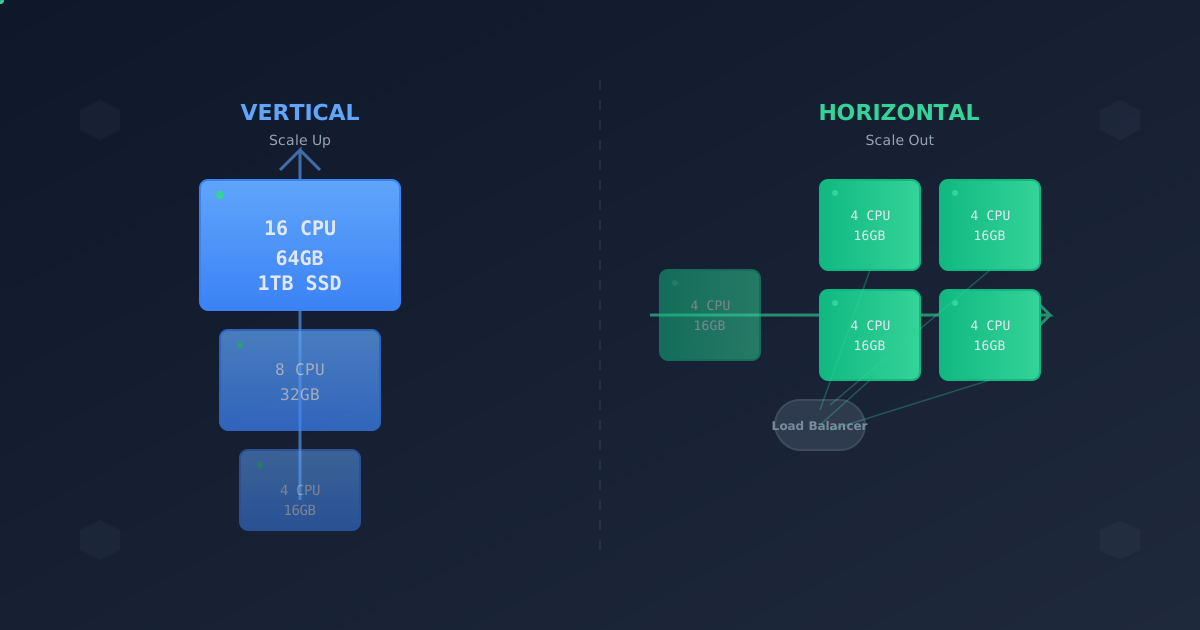
Two fundamental approaches: Vertical scaling (make servers bigger) and Horizontal scaling (add more servers). The choice seems simple, but the implications are profound.
I’ve scaled systems both ways, learned expensive lessons, and I’ll share what actually matters when making this decision.
Vertical Scaling: Bigger is Better
What It Is
Vertical scaling means upgrading your existing machines. More CPU, more RAM, faster disks, better network cards. You replace your 4-core server with an 8-core server, then 16-core, then 32-core.
Before:
┌──────────────┐
│   Server     │
│  4 CPU       │
│  16GB RAM    │
└──────────────┘

After:
┌──────────────┐
│   Server     │
│  16 CPU      │
│  64GB RAM    │
└──────────────┘
When It Works Well
Databases are the classic use case. Postgres, MySQL, MongoDB—these love vertical scaling. More RAM means larger caches, fewer disk reads, faster queries. More CPU means more concurrent connections.
We ran our main Postgres database on a 4-core, 16GB instance. Queries were slow. Connections maxed out. We scaled to 8-core, 32GB. Everything instantly got better:
- Query latency: 150ms → 45ms
- Connections: maxed at 100 → comfortable at 200
- Cache hit ratio: 85% → 97%
Stateful applications benefit from vertical scaling. Redis, Elasticsearch, any system that maintains significant in-memory state. Adding RAM is often cheaper and simpler than sharding.
Single-threaded workloads hit a ceiling with horizontal scaling. If your application can’t parallelize, throwing more servers won’t help. You need faster cores.
The Limits
Vertical scaling has hard limits. You can’t buy a 1000-core server. Cloud providers cap instance sizes. AWS’s largest instance (u-24tb1.metal) has 896 cores and 24TB RAM. Sounds huge, but you’ll hit diminishing returns long before then.
Cost scaling is non-linear. Doubling resources often more than doubles cost:
| Instance | CPU | RAM | Monthly Cost |
|---|---|---|---|
| t3.medium | 2 | 4GB | $30 |
| t3.xlarge | 4 | 16GB | $122 |
| t3.2xlarge | 8 | 32GB | $245 |
| r6i.4xlarge | 16 | 128GB | $806 |
Going from t3.medium to r6i.4xlarge gives you 8x CPU and 32x RAM, but costs 27x more.
Single point of failure remains. If your one big server goes down, your entire application is down. No amount of CPU or RAM fixes that.
Real-World Example: Database Scaling
Our e-commerce platform’s Postgres database was hitting limits. Here’s what we tried:
First attempt: Horizontal (read replicas)
- Added 3 read replicas
- Modified code to route reads to replicas
- Cost: 4x database spend
- Result: Writes still bottlenecked, replication lag caused issues
Second attempt: Vertical (bigger primary)
- Upgraded from db.r5.2xlarge (8 vCPU, 64GB) to db.r5.8xlarge (32 vCPU, 256GB)
- Cost: 4x primary cost (same as replica approach)
- Result: Write throughput increased 3.5x, no code changes needed
Vertical won here. Same cost, better results, simpler architecture.
Horizontal Scaling: More is Better
What It Is
Horizontal scaling means adding more servers. Instead of one big server, you run many smaller servers behind a load balancer.
Before:
┌──────────────┐
│   Server     │
│  8 CPU       │
│  32GB RAM    │
└──────────────┘

After:
                ┌──────────────┐
                │Load Balancer │
                └──────┬───────┘
         ┌─────────────┼─────────────┐
         ▼             ▼             ▼
    ┌────────┐    ┌────────┐    ┌────────┐
    │Server 1│    │Server 2│    │Server 3│
    │ 4 CPU  │    │ 4 CPU  │    │ 4 CPU  │
    │ 16GB   │    │ 16GB   │    │ 16GB   │
    └────────┘    └────────┘    └────────┘
When It Works Well
Stateless applications are perfect candidates. Web servers, API servers, worker processes—if they don’t maintain state between requests, they scale horizontally beautifully.
Our REST API initially ran on 2 large servers. As traffic grew, we added smaller servers. Eventually we ran 20 small instances, each handling 1/20th of the traffic. Benefits:
- Fault tolerance: One server failing = 95% capacity remains
- Smooth scaling: Add/remove servers gradually
- Cost efficiency: Small instances are price-competitive
- No downtime deploys: Roll updates one server at a time
Parallel workloads benefit enormously. Video encoding, image processing, data transformation—if tasks are independent, horizontal scaling gives you linear performance gains.
We built a video transcoding pipeline. Each worker grabs a job from the queue, processes it, and moves on. Scaling from 5 to 50 workers increased throughput 10x.
Geographic distribution requires horizontal scaling. You can’t vertical-scale your way to low latency for global users. You need servers in multiple regions.
The Challenges
State management becomes complex. Session data, caches, and distributed locks all need rethinking:
// Won't work with horizontal scaling
const sessions = {};
app.post('/login', (req, res) => {
  const sessionId = generateId();
  sessions[sessionId] = { userId: req.body.userId };
  res.cookie('session', sessionId);
});

// Need centralized state
const redis = new Redis();
app.post('/login', async (req, res) => {
  const sessionId = generateId();
  await redis.set(`session:${sessionId}`, req.body.userId, 'EX', 3600);
  res.cookie('session', sessionId);
});
Coordination overhead increases. Load balancers, service discovery, health checks, distributed configuration—the infrastructure gets more complex.
Data consistency is harder. With one server, updating a counter is simple. With 100 servers, you need distributed transactions, eventual consistency, or conflict resolution.
Real-World Example: API Server Scaling
Our API served 1000 requests/second, running on 4 large instances (c5.4xlarge, 16 vCPU each). We wanted to scale to 5000 req/s.
Option A: Vertical (bigger instances)
- Upgrade to c5.9xlarge (36 vCPU)
- Expected capacity: ~2500 req/s per instance
- Need 2 instances for 5000 req/s
- Cost: 2 × $1,224/month = $2,448/month
Option B: Horizontal (more instances)
- Keep c5.4xlarge (16 vCPU)
- Need 20 instances for 5000 req/s (assuming linear scaling)
- Cost: 20 × $544/month = $10,880/month
Wait, that’s 4.4x more expensive! So vertical wins?
Not quite. The hidden factors:
- Autoscaling: With horizontal, we only run 20 instances at peak. Off-peak, we run 5 instances. Average cost: ~$4,000/month.
- Fault tolerance: Losing one of 2 big instances = 50% capacity loss. Losing one of 20 small instances = 5% capacity loss.
- Deploy risk: Deploying to 2 instances is all-or-nothing. Rolling out to 20 instances lets us catch issues early.
Horizontal won, but the calculus was more complex than it first appeared.
The Hybrid Approach
In reality, most systems use both strategies:
┌─────────────────────────────────────────────┐
│         Load Balancer                       │
└────────┬─────────────┬──────────────────────┘
         │             │
    ┌────▼─────┐  ┌────▼─────┐
    │  Web     │  │  Web     │     Horizontal scaling
    │  Server  │  │  Server  │     (stateless tier)
    │ (medium) │  │ (medium) │
    └────┬─────┘  └────┬─────┘
         └─────────────┘
              │
         ┌────▼────────────┐
         │   Database      │          Vertical scaling
         │   (very large)  │          (stateful tier)
         └─────────────────┘
Web tier: Scale horizontally for fault tolerance and smooth capacity growth. Database tier: Scale vertically for simplicity and performance.
This is the pattern we settled on for most applications.
Cost Analysis: The Real Story
Let’s compare real costs for a production workload (10,000 req/s API):
Vertical Scaling Approach
2 × c5.12xlarge instances (48 vCPU, 96GB)
- Instance cost: 2 × $1,632/month = $3,264/month
- Load balancer: $20/month
- Total: $3,284/month
Horizontal Scaling Approach
40 × c5.large instances (2 vCPU, 4GB)
- Peak instances: 40 × $62/month = $2,480/month
- Average instances (with autoscaling): 15 × $62/month = $930/month
- Load balancer: $20/month
- Total: $950/month
Horizontal is 71% cheaper with autoscaling. But there’s more:
Vertical approach hidden costs:
- No autoscaling benefit
- Need spare capacity for failover
- Actual cost: ~$4,000/month (need 4 instances for HA)
Horizontal approach hidden costs:
- More complex deployment pipeline
- More monitoring and alerting
- Service mesh overhead (if used)
- Engineering time: ~$2,000/month equivalent
Final comparison:
- Vertical: $4,000/month infrastructure + $500/month ops = $4,500/month
- Horizontal: $950/month infrastructure + $2,000/month ops = $2,950/month
Horizontal wins, but operational complexity is real.
Decision Framework
Here’s my framework for choosing:
Choose Vertical When:
- Stateful systems (databases, caches, message brokers)
- Single-tenant architecture (one customer per instance)
- Simplicity matters more than cost (early stage, small team)
- Workload can’t parallelize (single-threaded applications)
- Data locality is critical (large in-memory datasets)
Choose Horizontal When:
- Stateless applications (web servers, API servers, workers)
- High availability is critical (can’t afford downtime)
- Cost optimization matters (benefit from autoscaling)
- Geographic distribution needed (global user base)
- Workload is parallelizable (independent tasks)
Use Both When:
Most real systems! Scale different tiers differently:
- Web/API tier: Horizontal
- Database tier: Vertical (with horizontal read replicas)
- Cache tier: Vertical per shard, horizontal sharding
- Background workers: Horizontal
Scaling Patterns in Practice
Pattern 1: Vertical Database + Horizontal Application
The most common pattern:
┌─────────────────────────────────────────┐
│         Application Load Balancer       │
└────┬────┬────┬────┬────┬────┬──────────┘
     │    │    │    │    │    │
     ▼    ▼    ▼    ▼    ▼    ▼
    [10 web servers - horizontal]
              │
              ▼
     ┌──────────────┐
     │   Primary    │
     │   Database   │ ← Vertical scaling
     │  (very big)  │
     └──────────────┘
Pattern 2: Horizontal Everything with Sharding
For massive scale:
┌─────────────────────────────────────────┐
│         Global Load Balancer            │
└────┬────────────┬────────────┬──────────┘
     │            │            │
     ▼            ▼            ▼
   [Web]        [Web]        [Web]       ← Horizontal
     │            │            │
     ▼            ▼            ▼
 [DB Shard 0] [DB Shard 1] [DB Shard 2] ← Horizontal sharding
Pattern 3: Vertical with Failover
For high availability without horizontal complexity:
     ┌──────────────┐
     │   Primary    │
     │   Database   │
     │  (very big)  │
     └──────┬───────┘
            │ Replication
            ▼
     ┌──────────────┐
     │   Standby    │
     │   Database   │
     │  (very big)  │
     └──────────────┘
Migration Strategy
Switching scaling strategies isn’t trivial. Here’s how we’ve done it:
Vertical → Horizontal
-
Make application stateless
- Move sessions to Redis
- Externalize configuration
- Remove local file dependencies
-
Add load balancer
- Start with 2 instances
- Test session persistence
- Verify health checks
-
Gradually add instances
- Monitor performance per instance
- Adjust based on metrics
- Scale up during low-traffic periods
-
Decommission large instances
- Once confident in horizontal fleet
- Keep one for emergency rollback
Horizontal → Vertical
Less common, but happens when operational complexity exceeds benefits:
-
Provision large instance
- Calculate required capacity
- Add 30% buffer
-
Test with synthetic load
- Verify single instance can handle peak
- Check for single-instance bottlenecks
-
Cutover during low traffic
- Update DNS/load balancer
- Monitor closely
-
Decommission horizontal fleet
- Keep a few instances for 1 week
- Use as failover while validating
Kubernetes Changes Everything
Kubernetes makes horizontal scaling dramatically easier:
apiVersion: apps/v1
kind: Deployment
metadata:
  name: api-server
spec:
  replicas: 10  # Easily adjustable
  template:
    spec:
      containers:
      - name: api
        image: api:v1.2.3
        resources:
          requests:
            cpu: 500m
            memory: 512Mi
          limits:
            cpu: 1000m
            memory: 1Gi
---
apiVersion: autoscaling/v2
kind: HorizontalPodAutoscaler
metadata:
  name: api-server-hpa
spec:
  scaleTargetRef:
    apiVersion: apps/v1
    kind: Deployment
    name: api-server
  minReplicas: 5
  maxReplicas: 50
  metrics:
  - type: Resource
    resource:
      name: cpu
      target:
        type: Utilization
        averageUtilization: 70
Kubernetes HPA (Horizontal Pod Autoscaler) makes horizontal scaling nearly automatic. Vertical Pod Autoscaler exists but is less mature.
For stateful workloads in Kubernetes, you still typically scale vertically by increasing resource requests/limits.
The Future: Serverless
The ultimate form of horizontal scaling: serverless functions.
AWS Lambda, Google Cloud Functions, and Azure Functions scale to zero and scale to thousands instantly. You pay per-execution, not per-server.
For event-driven workloads, serverless eliminates the scaling decision entirely:
// Lambda function - AWS handles scaling
exports.handler = async (event) => {
  const order = JSON.parse(event.body);
  await processOrder(order);
  return { statusCode: 200 };
};
AWS will run 1 instance or 10,000 instances based on traffic. You don’t decide.
When serverless works:
- Event-driven workloads
- Unpredictable traffic patterns
- Microservices with low individual traffic
- Background job processing
When serverless doesn’t work:
- Long-running tasks (15-minute limit)
- Stateful applications
- WebSocket connections
- Very high sustained throughput (cost exceeds containers)
Lessons Learned
After scaling dozens of systems:
- Start vertical, add horizontal as needed - Don’t prematurely optimize for horizontal scaling
- Databases usually want vertical - Read replicas are horizontal, but primary benefits from big iron
- Stateless tiers want horizontal - The operational complexity pays off
- Measure don’t guess - Load test both approaches before committing
- Cost is non-obvious - Factor in operational complexity, autoscaling, and fault tolerance
- Kubernetes favors horizontal - If you’re on K8s, lean toward horizontal
- Serverless is horizontal taken to extreme - Consider it for the right workloads
Conclusion
Vertical vs horizontal isn’t an either-or decision. It’s about understanding the trade-offs and applying the right strategy to each layer of your system.
Vertical scaling gives you simplicity and performance for stateful systems. Horizontal scaling gives you fault tolerance and cost efficiency for stateless systems.
The best architectures use both strategically.
Start simple. Scale vertically until you can’t. Then scale horizontally where it makes sense. And always, always measure. Your intuition about scaling is probably wrong—let data guide you.
Scaled systems from 100 users to 10 million users. Made every mistake in the book. These lessons were expensive.