When Load Balancers Become Critical
At 2 AM, our API gateway failed. 50,000 concurrent users were suddenly hitting a single backend server that couldn’t handle the load. Response times went from 50ms to 30 seconds. Our on-call engineer restarted the load balancer, and traffic instantly distributed across 20 servers. Crisis averted.
That incident taught me something crucial: load balancers aren’t just about distributing traffic. They’re the foundation of high availability. When designed correctly, they prevent failures. When designed poorly, they become the single point of failure.
After running production load balancers for years, here’s what actually matters.
What is Load Balancing?
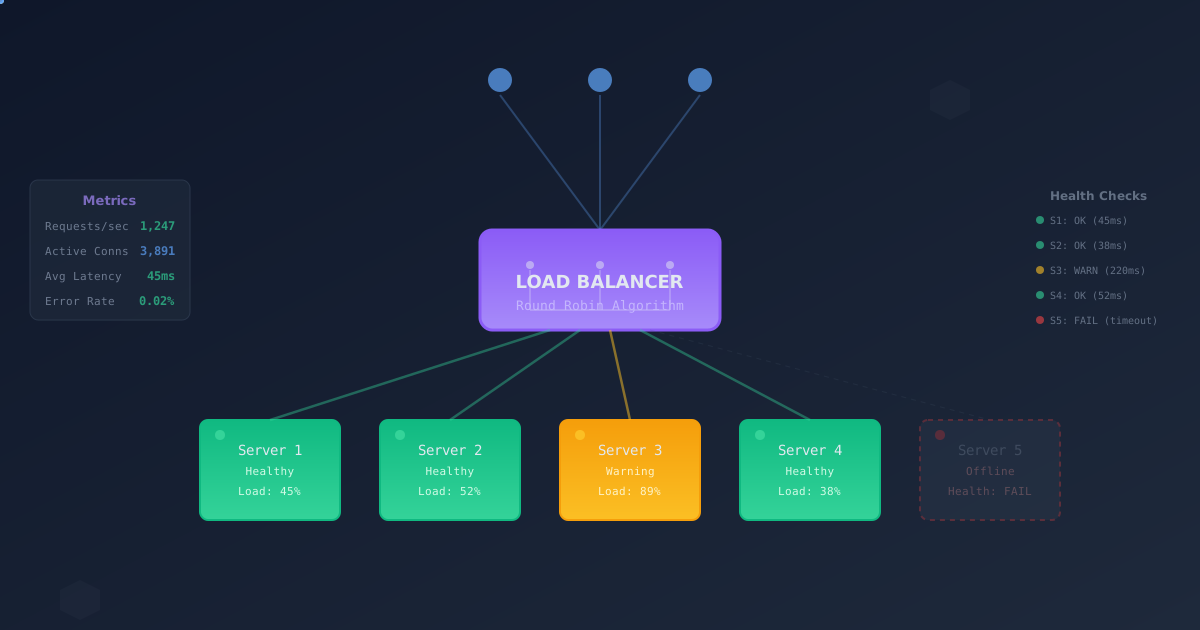
At its core, load balancing distributes network traffic across multiple servers. Simple concept, complex implementation.
         Client Requests
              │
              ▼
    ┌──────────────────┐
    │  Load Balancer   │
    └──────────────────┘
              │
    ┌─────────┼─────────┐
    ▼         ▼         ▼
┌────────┐┌────────┐┌────────┐
│Server 1││Server 2││Server 3│
└────────┘└────────┘└────────┘
But the devil is in the details: How do you decide which server gets which request? What happens when a server fails? How do you handle session state? How do you optimize for performance?
Load Balancing Layers
Load balancing happens at different layers of the network stack, each with distinct trade-offs.
Layer 4 (Transport Layer)
Operates at the TCP/UDP level. The load balancer sees IP addresses and ports, but not HTTP headers or application data.
Client → [Load Balancer] → Backend
         (sees TCP only)
Advantages:
- Fast - Minimal processing, low latency
- Protocol agnostic - Works with any TCP/UDP traffic
- High throughput - Can handle millions of connections
Disadvantages:
- Limited routing - Can’t route based on URL, headers, or body
- Sticky sessions harder - No access to cookies
- No content-based decisions - Can’t cache, compress, or modify traffic
Use cases:
- Database connections
- WebSocket servers
- Message queues
- Any non-HTTP protocol
Example: HAProxy L4 config
frontend tcp_front
  bind *:3306
  mode tcp
  default_backend mysql_servers

backend mysql_servers
  mode tcp
  balance roundrobin
  option tcp-check
  server mysql1 10.0.1.10:3306 check
  server mysql2 10.0.1.11:3306 check
  server mysql3 10.0.1.12:3306 check
Layer 7 (Application Layer)
Operates at the HTTP level. The load balancer terminates the client connection, inspects the HTTP request, and makes routing decisions based on content.
Client → [Load Balancer] → Backend
         (sees full HTTP request)
Advantages:
- Content-based routing - Route based on URL, headers, cookies
- Advanced features - SSL termination, compression, caching
- Session affinity - Sticky sessions via cookies
- Application awareness - Can retry failed requests, handle errors
Disadvantages:
- Higher latency - Must parse HTTP
- CPU intensive - SSL/TLS termination and HTTP processing
- HTTP only - Doesn’t work for other protocols
Use cases:
- Web applications
- REST APIs
- Microservices
- CDN origins
Example: NGINX L7 config
upstream api_servers {
  least_conn;
  server api1.internal:8080 max_fails=3 fail_timeout=30s;
  server api2.internal:8080 max_fails=3 fail_timeout=30s;
  server api3.internal:8080 max_fails=3 fail_timeout=30s;
}

server {
  listen 443 ssl http2;
  server_name api.example.com;

  ssl_certificate /etc/ssl/api.crt;
  ssl_certificate_key /etc/ssl/api.key;

  location /v1/ {
    proxy_pass http://api_servers;
    proxy_set_header Host $host;
    proxy_set_header X-Real-IP $remote_addr;
  }

  location /v2/ {
    proxy_pass http://api_v2_servers;
  }
}
Load Balancing Algorithms
The algorithm determines which backend server handles each request. Choosing the right one is critical.
Round Robin
Simplest algorithm: distribute requests equally, cycling through servers.
Request 1 → Server 1
Request 2 → Server 2
Request 3 → Server 3
Request 4 → Server 1
Request 5 → Server 2
When it works:
- Servers have equal capacity
- Requests have similar processing time
- Stateless applications
When it fails:
- Servers have different specs (old + new hardware)
- Requests vary wildly in processing time (small queries vs large reports)
Real-world example:
We used round robin for our API servers. Worked great until we added new servers with 2x the CPU. The new servers were bored while old servers were maxed out.
Solution: Weighted round robin.
Weighted Round Robin
Like round robin, but servers get different weights based on capacity.
Server 1: weight 1 (old hardware)
Server 2: weight 2 (new hardware)
Server 3: weight 2 (new hardware)

Request distribution:
1 → Server 2
2 → Server 3
3 → Server 2
4 → Server 1
5 → Server 3
Configuration example:
upstream api_servers {
  server api1.internal:8080 weight=1;  # Old server
  server api2.internal:8080 weight=2;  # New server
  server api3.internal:8080 weight=2;  # New server
}
Least Connections
Send new requests to the server with fewest active connections.
Server 1: 10 connections
Server 2: 5 connections   ← Next request goes here
Server 3: 8 connections
When it works:
- Requests have variable processing times
- Some requests are long-lived (WebSocket, streaming)
- Server capacity is similar
When it fails:
- Connection count doesn’t reflect load (short connections with heavy processing)
Real-world example:
Our WebSocket server used round robin. Problem: Some connections lasted hours (dashboard), others seconds (notifications). Round robin resulted in uneven load.
After switching to least connections, load distributed evenly. Server CPU usage went from 30%/80%/45% to 52%/51%/49%.
Least Response Time
Send requests to the server with the lowest average response time.
Server 1: avg 50ms, 10 connections
Server 2: avg 120ms, 5 connections
Server 3: avg 45ms, 8 connections   ← Next request goes here
When it works:
- Servers have different performance characteristics
- You want to optimize for latency
- Backends might have cache warm-up differences
When it fails:
- Requires active monitoring overhead
- Can create feedback loops (slow server gets fewer requests, stays slow)
IP Hash
Route based on client IP address. Same client always goes to same server.
hash(client_ip) % server_count = server_index

hash(192.168.1.10) → Server 2
hash(192.168.1.11) → Server 1
hash(192.168.1.12) → Server 2
When it works:
- Caching per-server (client hits same cache)
- Stateful applications without session store
- Rate limiting per-server
When it fails:
- Clients behind NAT look like single IP
- Doesn’t adapt to server failures well
- Can create uneven distribution
Configuration example:
upstream api_servers {
  ip_hash;
  server api1.internal:8080;
  server api2.internal:8080;
  server api3.internal:8080;
}
Consistent Hashing
Like IP hash, but handles server additions/removals better. Used extensively in distributed systems.
When a server is added or removed, only ~1/N requests are remapped (where N is the number of servers).
When it works:
- Caching systems (Memcached, Redis clusters)
- Distributed databases
- Content delivery networks
Implementation example:
class ConsistentHash {
  constructor(nodes, virtualNodes = 150) {
    this.ring = new Map();
    this.nodes = new Set();
    this.virtualNodes = virtualNodes;
    nodes.forEach(node => this.addNode(node));
  }

  hash(key) {
    // Simple hash function (use better one in production)
    let hash = 0;
    for (let i = 0; i < key.length; i++) {
      hash = ((hash << 5) - hash) + key.charCodeAt(i);
      hash = hash & hash;
    }
    return Math.abs(hash);
  }

  addNode(node) {
    this.nodes.add(node);
    // Add virtual nodes to ring
    for (let i = 0; i < this.virtualNodes; i++) {
      const hash = this.hash(`${node}:${i}`);
      this.ring.set(hash, node);
    }
  }

  removeNode(node) {
    this.nodes.delete(node);
    // Remove virtual nodes from ring
    for (let i = 0; i < this.virtualNodes; i++) {
      const hash = this.hash(`${node}:${i}`);
      this.ring.delete(hash);
    }
  }

  getNode(key) {
    if (this.ring.size === 0) return null;

    const hash = this.hash(key);
    const hashes = Array.from(this.ring.keys()).sort((a, b) => a - b);

    // Find first node clockwise
    for (const h of hashes) {
      if (h >= hash) {
        return this.ring.get(h);
      }
    }

    // Wrap around
    return this.ring.get(hashes[0]);
  }
}

// Usage
const lb = new ConsistentHash(['server1', 'server2', 'server3']);
console.log(lb.getNode('user:123'));  // → server2
console.log(lb.getNode('user:456'));  // → server1
Health Checking
Load balancers must detect when servers fail and stop sending traffic to them. Health checks are critical.
Active Health Checks
Load balancer actively probes servers at regular intervals.
HTTP health check example:
upstream api_servers {
  server api1.internal:8080;
  server api2.internal:8080;
  server api3.internal:8080;

  # NGINX Plus only
  check interval=3000 rise=2 fall=3 timeout=1000 type=http;
  check_http_send "GET /health HTTP/1.0\r\n\r\n";
  check_http_expect_alive http_2xx http_3xx;
}
TCP health check example:
frontend tcp_front
  bind *:3306
  mode tcp
  default_backend mysql_servers

backend mysql_servers
  mode tcp
  option tcp-check
  tcp-check connect
  server mysql1 10.0.1.10:3306 check inter 2s rise 2 fall 3
  server mysql2 10.0.1.11:3306 check inter 2s rise 2 fall 3
Parameters explained:
- interval: How often to check (2s = every 2 seconds)
- rise: Successful checks before marking healthy
- fall: Failed checks before marking unhealthy
- timeout: How long to wait for response
Passive Health Checks
Monitor actual traffic and mark servers unhealthy based on errors.
Example configuration:
upstream api_servers {
  server api1.internal:8080 max_fails=3 fail_timeout=30s;
  server api2.internal:8080 max_fails=3 fail_timeout=30s;
  server api3.internal:8080 max_fails=3 fail_timeout=30s;
}
If a server returns 3 errors within the fail_timeout window, it’s marked down for 30 seconds.
Best Practices
-
Use both active and passive checks
- Active checks detect failure quickly
- Passive checks catch application-level issues
-
Health check endpoints should be lightweight
app.get('/health', (req, res) => { // Bad: Heavy database query // const users = await db.query('SELECT COUNT(*) FROM users'); // Good: Quick checks only const checks = { database: await db.ping(), redis: await redis.ping(), disk: checkDiskSpace(), }; if (Object.values(checks).every(c => c.healthy)) { res.status(200).json({ status: 'healthy', checks }); } else { res.status(503).json({ status: 'unhealthy', checks }); } }); -
Use appropriate thresholds
- Don’t mark down too quickly (false positives)
- Don’t wait too long (users hit failing server)
- Typical:
rise=2 fall=3 interval=2s
-
Monitor the health checks themselves
- Alert if health checks stop running
- Track health check latency
- Log health state changes
Session Persistence (Sticky Sessions)
For stateful applications, you need the same client to hit the same server.
Cookie-Based Stickiness
Load balancer sets a cookie indicating which server handled the request.
NGINX example:
upstream api_servers {
  sticky cookie srv_id expires=1h domain=.example.com path=/;
  server api1.internal:8080;
  server api2.internal:8080;
  server api3.internal:8080;
}
HAProxy example:
backend api_servers
  balance roundrobin
  cookie SERVERID insert indirect nocache
  server api1 10.0.1.10:8080 check cookie api1
  server api2 10.0.1.11:8080 check cookie api2
  server api3 10.0.1.12:8080 check cookie api3
IP-Based Stickiness
Route based on source IP (less reliable due to NAT, proxies).
upstream api_servers {
  ip_hash;
  server api1.internal:8080;
  server api2.internal:8080;
  server api3.internal:8080;
}
Application-Level Sessions
Better approach: Store sessions externally.
const session = require('express-session');
const RedisStore = require('connect-redis')(session);
const redis = require('redis');

const client = redis.createClient({
  host: 'redis.internal',
  port: 6379,
});

app.use(session({
  store: new RedisStore({ client }),
  secret: 'your-secret-key',
  resave: false,
  saveUninitialized: false,
  cookie: { maxAge: 3600000 }, // 1 hour
}));
Now any server can handle any request. No stickiness needed.
High Availability Patterns
Active-Active
Multiple load balancers, all handling traffic simultaneously.
    ┌────────────┐
    │   DNS RR   │
    └────┬───┬───┘
         │   │
    ┌────▼───▼────┐
    │   LB1   LB2 │ (Both active)
    └────┬───┬────┘
         │   │
    ┌────▼───▼────┐
    │ Backends    │
    └─────────────┘
Implementation with DNS:
api.example.com    A    203.0.113.10  (LB1)
api.example.com    A    203.0.113.11  (LB2)
Clients get both IPs via DNS round robin.
Pros:
- Full utilization of both load balancers
- Automatic failover (clients try next IP)
Cons:
- DNS caching delays failover
- Clients must handle retry logic
Active-Passive with Keepalived
One load balancer active, one standby. Virtual IP floats between them.
┌─────────────────────────────────┐
│  Virtual IP: 203.0.113.100      │
└────────────┬────────────────────┘
             │
    ┌────────▼────────┐
    │  LB1 (MASTER)   │ ← Owns VIP
    └─────────────────┘

    ┌─────────────────┐
    │  LB2 (BACKUP)   │ ← Takes VIP if LB1 fails
    └─────────────────┘
Keepalived configuration (LB1):
vrrp_instance VI_1 {
  state MASTER
  interface eth0
  virtual_router_id 51
  priority 101
  advert_int 1

  authentication {
    auth_type PASS
    auth_pass secret123
  }

  virtual_ipaddress {
    203.0.113.100/24
  }
}
Keepalived configuration (LB2):
vrrp_instance VI_1 {
  state BACKUP
  interface eth0
  virtual_router_id 51
  priority 100  # Lower than master
  advert_int 1

  authentication {
    auth_type PASS
    auth_pass secret123
  }

  virtual_ipaddress {
    203.0.113.100/24
  }
}
Pros:
- Fast failover (2-3 seconds)
- No DNS changes needed
- Simple client configuration
Cons:
- Wasted capacity (backup idle)
- Split-brain risk (need fencing)
Cloud Load Balancers
AWS/GCP/Azure provide managed load balancers with built-in HA.
AWS ALB example:
Resources:
  ApplicationLoadBalancer:
    Type: AWS::ElasticLoadBalancingV2::LoadBalancer
    Properties:
      Subnets:
        - subnet-12345  # AZ 1
        - subnet-67890  # AZ 2
        - subnet-abcde  # AZ 3
      SecurityGroups:
        - sg-12345

  TargetGroup:
    Type: AWS::ElasticLoadBalancingV2::TargetGroup
    Properties:
      VpcId: vpc-12345
      Protocol: HTTP
      Port: 8080
      HealthCheckPath: /health
      HealthCheckIntervalSeconds: 10
      HealthCheckTimeoutSeconds: 5
      HealthyThresholdCount: 2
      UnhealthyThresholdCount: 3
Pros:
- Fully managed (no servers to maintain)
- Auto-scaling built-in
- Multi-AZ by default
- Integrated with cloud services
Cons:
- Vendor lock-in
- Cost (can be expensive at scale)
- Less control over configuration
Real-World Architecture
Here’s our production setup for a high-traffic API:
                    ┌──────────────┐
                    │  Cloudflare  │ (Global CDN + DDoS)
                    └──────┬───────┘
                           │
                    ┌──────▼───────┐
                    │   AWS ALB    │ (L7, multi-AZ)
                    └──────┬───────┘
                           │
        ┌──────────────────┼──────────────────┐
        │                  │                  │
    ┌───▼────┐        ┌───▼────┐        ┌───▼────┐
    │ API    │        │ API    │        │ API    │
    │ Server │        │ Server │        │ Server │
    │  AZ-1  │        │  AZ-2  │        │  AZ-3  │
    └───┬────┘        └───┬────┘        └───┬────┘
        │                  │                  │
        └──────────────────┼──────────────────┘
                           │
                    ┌──────▼───────┐
                    │  Redis       │
                    │  Cluster     │ (Session store)
                    └──────────────┘
Why this design:
- Cloudflare: Absorbs DDoS, serves cached responses, SSL termination
- AWS ALB: L7 routing, health checks, auto-scaling integration
- Multi-AZ: Survive full availability zone failure
- Redis cluster: Shared session state, no sticky sessions needed
Failure scenarios:
- Single API server fails → ALB stops sending traffic, auto-scaling replaces
- Entire AZ fails → Traffic routes to remaining AZs
- ALB fails → AWS replaces it (managed service)
- Cloudflare POP fails → DNS routes to next POP
We’ve run this for 3 years with 99.99% uptime.
Performance Tuning
Connection Pooling
Load balancers maintain connection pools to backends, reusing connections instead of creating new ones.
NGINX:
upstream api_servers {
  server api1.internal:8080;
  server api2.internal:8080;

  keepalive 32;  # Pool size
  keepalive_timeout 60s;
}

server {
  location / {
    proxy_pass http://api_servers;
    proxy_http_version 1.1;
    proxy_set_header Connection "";
  }
}
HTTP/2 and HTTP/3
Modern protocols reduce overhead:
server {
  listen 443 ssl http2;
  listen 443 quic reuseport;  # HTTP/3

  ssl_certificate /etc/ssl/cert.pem;
  ssl_certificate_key /etc/ssl/key.pem;

  add_header Alt-Svc 'h3=":443"; ma=86400';
}
Rate Limiting
Protect backends from overload:
limit_req_zone $binary_remote_addr zone=api:10m rate=10r/s;

server {
  location /api/ {
    limit_req zone=api burst=20 nodelay;
    proxy_pass http://api_servers;
  }
}
Observability
You can’t fix what you can’t see. Essential metrics:
Load Balancer Metrics
- Request rate (req/s)
- Error rate (errors/s, by status code)
- Latency (p50, p95, p99)
- Active connections
- Backend health status
- SSL handshake time
Prometheus exporters:
For NGINX:
- job_name: 'nginx'
  static_configs:
    - targets: ['localhost:9113']
For HAProxy:
- job_name: 'haproxy'
  static_configs:
    - targets: ['localhost:9101']
Backend Metrics
- Request rate per backend
- Error rate per backend
- Latency per backend
- Connection count per backend
- Health check success rate
Alerting Rules
groups:
- name: load_balancer
  rules:
  - alert: BackendDown
    expr: haproxy_server_up == 0
    for: 1m
    annotations:
      summary: "Backend {{ $labels.server }} is down"

  - alert: HighErrorRate
    expr: rate(haproxy_server_http_responses_total{code="5xx"}[5m]) > 0.05
    for: 2m
    annotations:
      summary: "5xx error rate above 5%"

  - alert: HighLatency
    expr: haproxy_server_response_time_average_seconds > 1
    for: 5m
    annotations:
      summary: "Backend latency above 1s"
Common Mistakes
1. No Health Checks
Sending traffic to failed servers. Always implement health checks.
2. Health Checks Too Aggressive
Marking servers unhealthy due to transient issues. Use rise and fall thresholds.
3. Single Load Balancer
Load balancer becomes single point of failure. Always run redundant load balancers.
4. Forgetting SSL Termination
Offload SSL to load balancer, not backends. Reduces backend CPU usage.
5. Not Planning for Failure
What happens when a backend fails? When the load balancer fails? When an entire datacenter fails? Test these scenarios.
6. Sticky Sessions Without Fallback
Server fails, sticky session breaks, user loses state. Use external session store.
7. Not Monitoring
Can’t detect issues if you’re not watching. Implement comprehensive monitoring.
Conclusion
Load balancing is the foundation of high availability. It’s not just distributing traffic—it’s about:
- Health checking to detect failures
- Choosing algorithms that match your workload
- Session management for stateful applications
- Redundancy at every layer
- Monitoring to catch issues early
Start simple: Round robin with health checks. Add complexity only when needed. And always, always have redundant load balancers.
The 2 AM incident I mentioned? It happened because we ran a single load balancer. Never again. Now we run active-active load balancers across multiple availability zones. We haven’t had a load balancer outage in 3 years.
Your users will never appreciate your load balancer. Until it fails. Make sure it doesn’t.
Running production load balancers serving 100M+ requests/day. Every failure taught a lesson. This is what survived.