TL;DR
git-steer is a Model Context Protocol (MCP) server that gives you 100% autonomous control over your GitHub account through natural language. But what makes it unique isn’t what it does—it’s what it doesn’t do.
- Zero local code: No repos cloned to your machine
- Keychain only: Just GitHub App credentials stored locally
- Git as database: All state lives in a private repo
- Actions as compute: Code changes happen in ephemeral cloud workers
- Interactive dashboard: Real-time security posture at a glance — view it live
Your machine steers. GitHub does everything else.
Git-Steer Series:
- Introduction (this post) - Architecture, philosophy, and the interactive dashboard
- Setup Guide - Step-by-step installation
- Advanced Patterns - Custom workflows and extensions
The Problem: Local Development Clutter
Every developer knows this pattern:
cd ~/Projects
ls -la
# 47 directories, 12GB of node_modules,
# half of them you haven't touched in months
When you manage multiple repositories—fixing security vulnerabilities, updating dependencies, creating PRs—you end up with a graveyard of cloned repos, stale branches, and forgotten package-lock.json files.
What if your local machine could orchestrate all of this without storing any of it?
Philosophy: Zero Footprint
Nothing lives locally—no cloned repos, no config files, no build artifacts. git-steer treats your Mac as a thin control plane and GitHub as the entire runtime.
┌─────────────────────────────────────────────────────────────────┐
│                        YOUR MAC                                  │
│                                                                  │
│   Keychain:                                                      │
│     - GitHub App private key                                     │
│     - App ID / Installation ID                                   │
│                                                                  │
│   $ npx git-steer                                                │
│         │                                                        │
│         ├─► Pulls itself from ry-ops/git-steer                   │
│         ├─► Pulls state from ry-ops/git-steer-state              │
│         ├─► Runs MCP server in-memory                            │
│         └─► Commits state changes back on shutdown               │
│                                                                  │
└─────────────────────────────────────────────────────────────────┘
                               │
                               ▼
┌─────────────────────────────────────────────────────────────────┐
│                         GITHUB                                   │
│                                                                  │
│   ry-ops/git-steer              (source of truth for code)       │
│   │                                                              │
│   ry-ops/git-steer-state        (private repo)                   │
│   ├── config/                                                    │
│   │   ├── policies.yaml         (branch protection templates)    │
│   │   ├── schedules.yaml        (job definitions)                │
│   │   └── managed-repos.yaml    (what git-steer controls)        │
│   ├── state/                                                     │
│   │   ├── jobs.jsonl            (job history, append-only)       │
│   │   ├── audit.jsonl           (action log)                     │
│   │   ├── rfcs.jsonl            (RFC lifecycle tracking)         │
│   │   ├── quality.jsonl         (linter/SAST results)            │
│   │   └── cache.json            (rate limits, etags)             │
│   └── .github/workflows/                                         │
│       └── heartbeat.yml         (scheduled triggers)             │
│                                                                  │
└─────────────────────────────────────────────────────────────────┘
Your Mac has exactly four things:
- GitHub App ID (in Keychain)
- Installation ID (in Keychain)
- Private Key (in Keychain)
- Claude Desktop config pointing to git-steer
That’s it. No config files. No dotfiles. No ~/.git-steer. No cloned repos.
How Code Changes Work
This is where it gets interesting. When you ask git-steer to fix security vulnerabilities or make other code changes, it dispatches a GitHub Actions workflow instead of cloning code locally:
┌─────────────────────────────────────────────────────────────────┐
│  YOUR MAC (MCP triggers intent)                                  │
│                                                                  │
│  You: "Fix security vulnerabilities in cortex"                   │
│       │                                                          │
│       ▼                                                          │
│  Claude → git-steer MCP: security_fix_pr(repo: "cortex")         │
│       │                                                          │
│       └─► Dispatches workflow to GitHub Actions                  │
└─────────────────────────────────────────────────────────────────┘
                               │
                               ▼
┌─────────────────────────────────────────────────────────────────┐
│  GITHUB ACTIONS (ephemeral compute)                              │
│                                                                  │
│  .github/workflows/security-fix.yml:                             │
│    - Checkout target repo                                        │
│    - Update dependencies                                         │
│    - npm install / uv lock                                       │
│    - Run tests                                                   │
│    - Create branch, commit, push                                 │
│    - Open PR                                                     │
│    - Report status back to git-steer-state                       │
└─────────────────────────────────────────────────────────────────┘
Your Mac stays clean. No node_modules. No Python venvs. No lock files. Just pure orchestration.
v0.2.0: Autonomous Security Operations
v0.2.0 transforms git-steer from a manual orchestration tool into a fully autonomous security pipeline. A single tool call replaces hours of repo-by-repo CVE hunting.
Security Sweep Pipeline
security_sweep(severity: "high", repos: ["org/app1", "org/app2"])What happens:
- Scans each repo for Dependabot alerts + CodeQL findings
- Creates ITIL-formatted RFC issues with CVE tables and risk assessments
- Dispatches a GitHub Actions workflow that fixes dependencies across all repos in parallel
- Tracks everything—PRs linked to RFC issues, MTTR calculations, fix verification
- Auto-triggers via heartbeat when new critical alerts appear
Code Quality Sweeps
code_quality_sweep(owner: "org", repo: "app", tools: ["auto"])Auto-detects language stack and runs appropriate linters (ESLint, Ruff, Bandit, gosec) via GitHub Actions. Results feed into the dashboard.
Compliance Reports
report_generate(template: "executive-summary")Executive summaries, change records, vulnerability reports, and full audit trails—generated as markdown from the same state data that powers the dashboard.
Interactive Security Dashboard
This is the centerpiece of v0.2.0. A single call:
dashboard_generate()…scans your repos, builds an interactive BI-style dashboard, and deploys it to GitHub Pages. View the live dashboard →
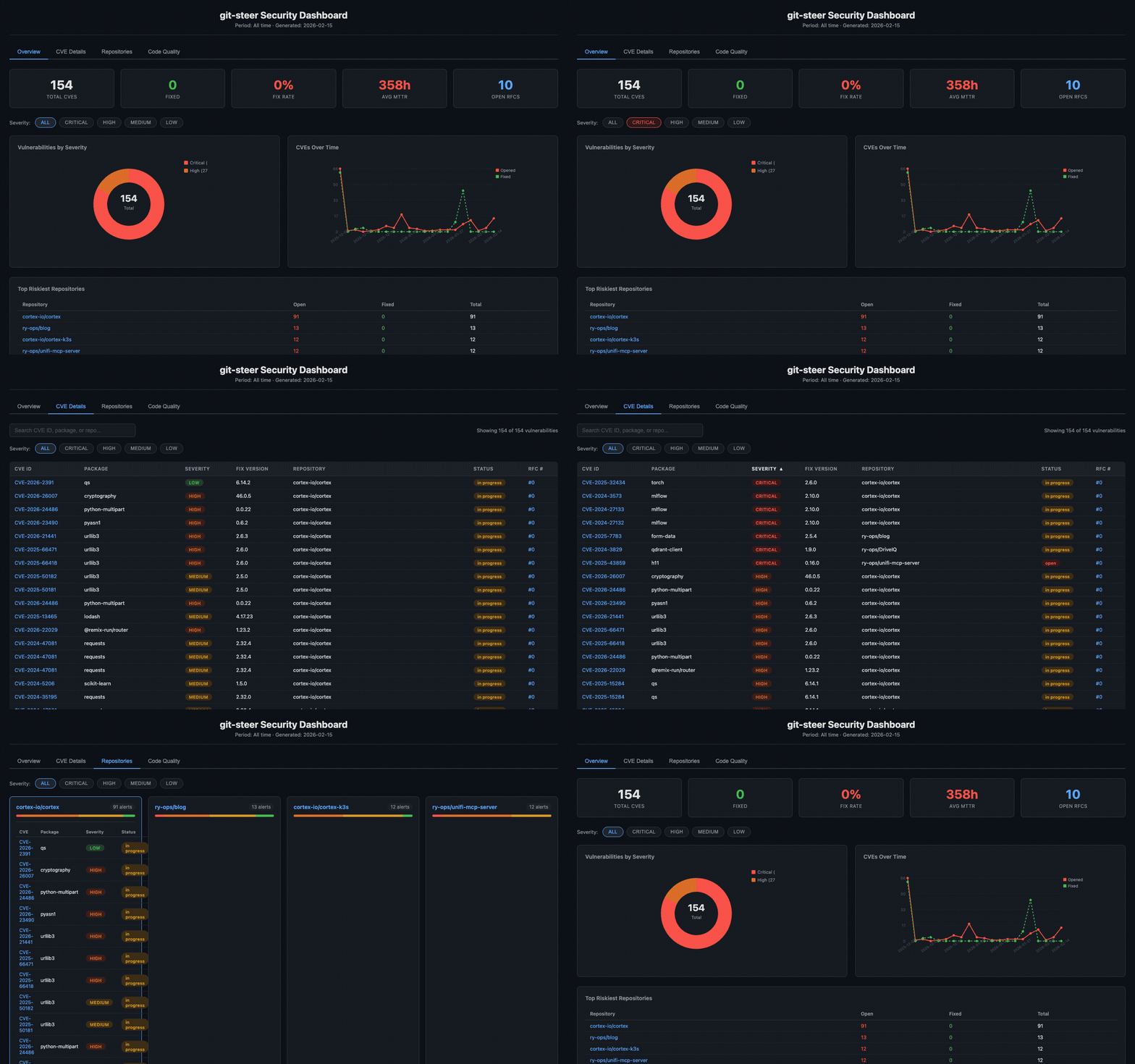
The dashboard is a single static HTML file—no build step, no external dependencies. All data is embedded as JSON and rendered client-side with vanilla JavaScript.
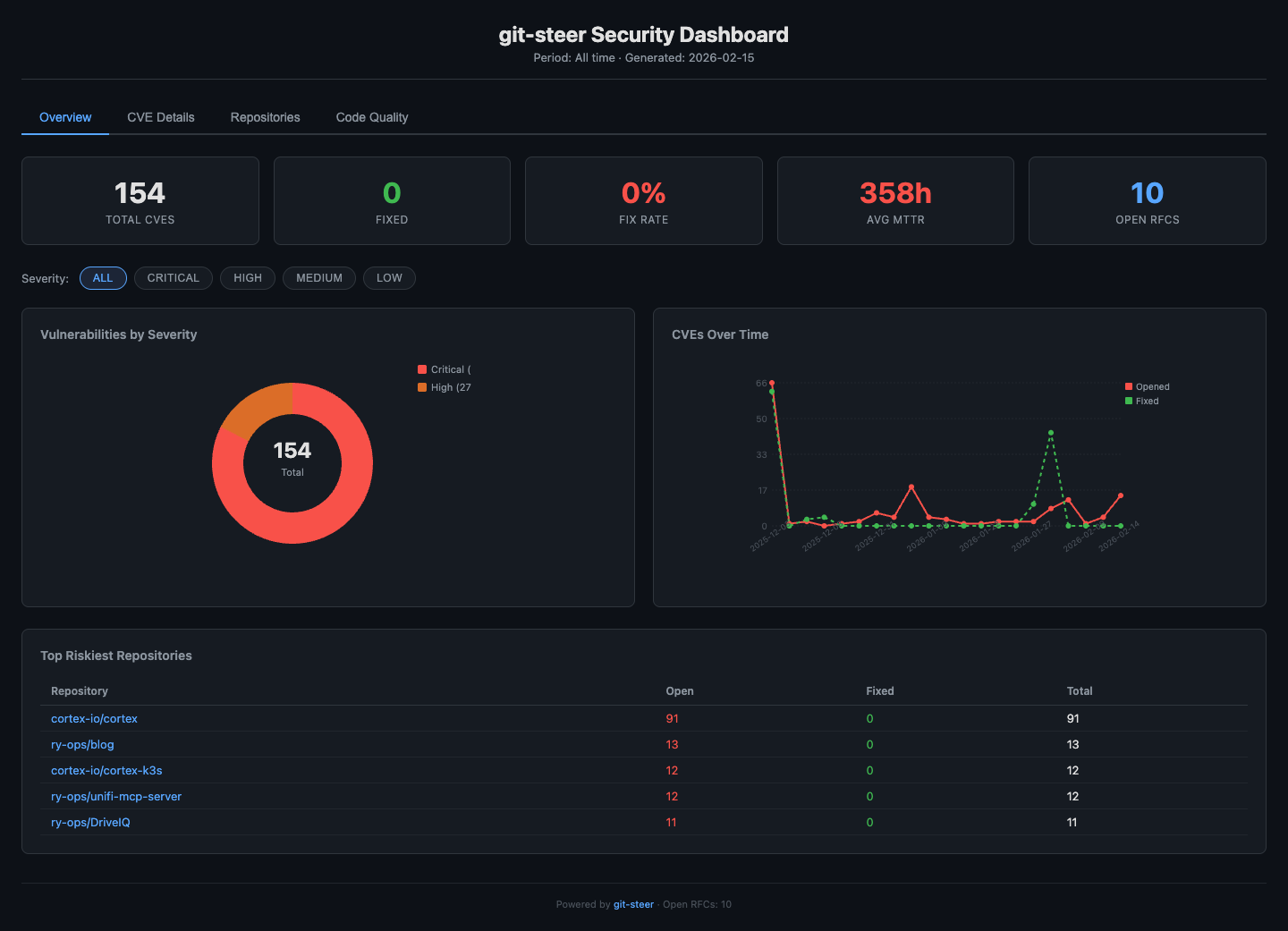
Overview Tab
Metric cards showing total CVEs, fix rate, average MTTR, and open RFCs. A severity donut chart and CVE timeline give you instant visual context. The top 5 riskiest repositories are clickable—jump straight to their detail view.
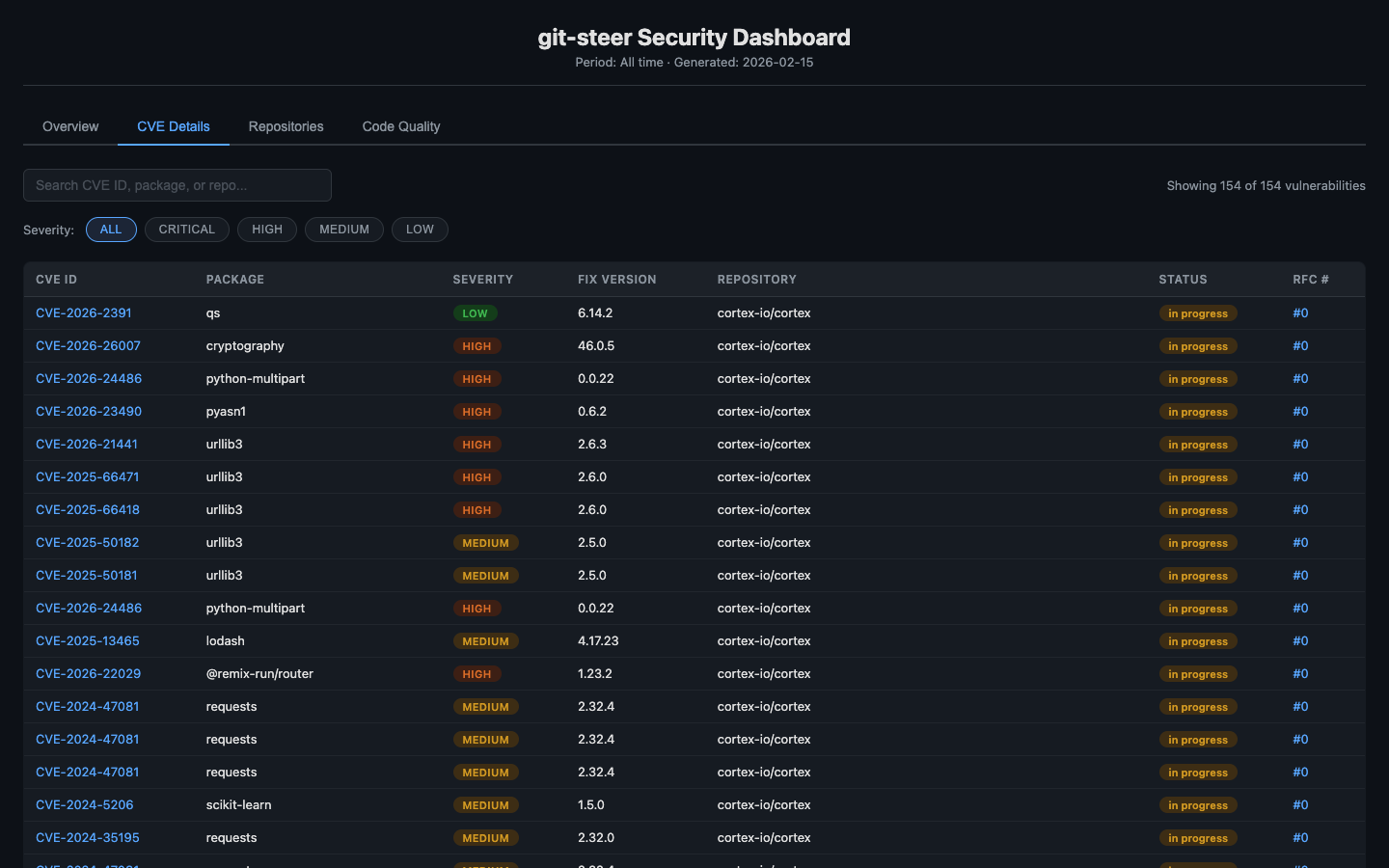
CVE Details Tab
Every individual vulnerability in a sortable, searchable table. Click any column header to sort ascending/descending. The search bar filters in real-time across CVE IDs, package names, and repo names. Each CVE ID links directly to the NVD detail page. Severity pills and status badges give instant visual context.
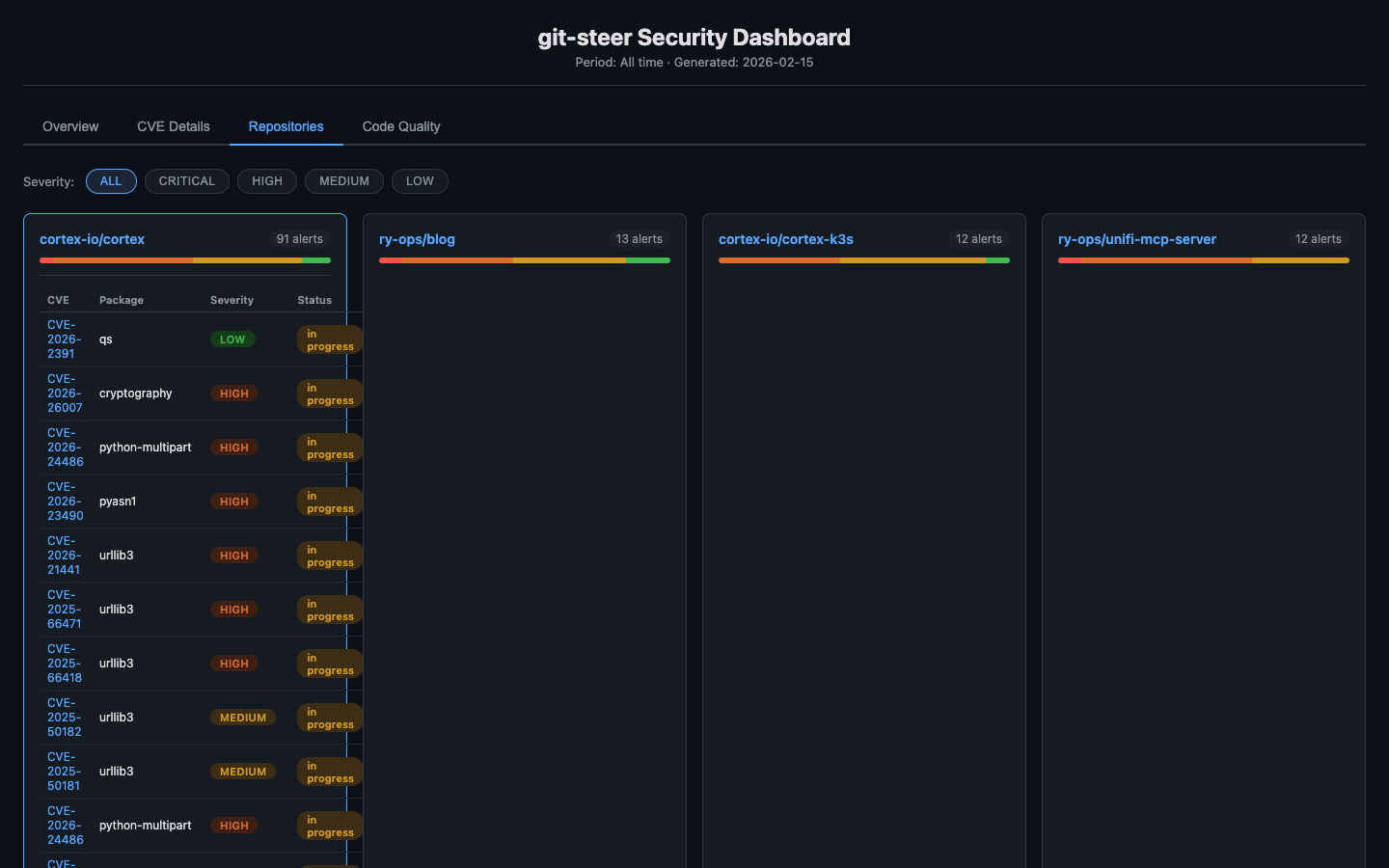
Repositories Tab
Each repository with alerts gets a card showing a severity breakdown bar. Click to expand and see that repo’s full CVE table. Clean repositories are collapsed at the bottom so they don’t clutter the view.
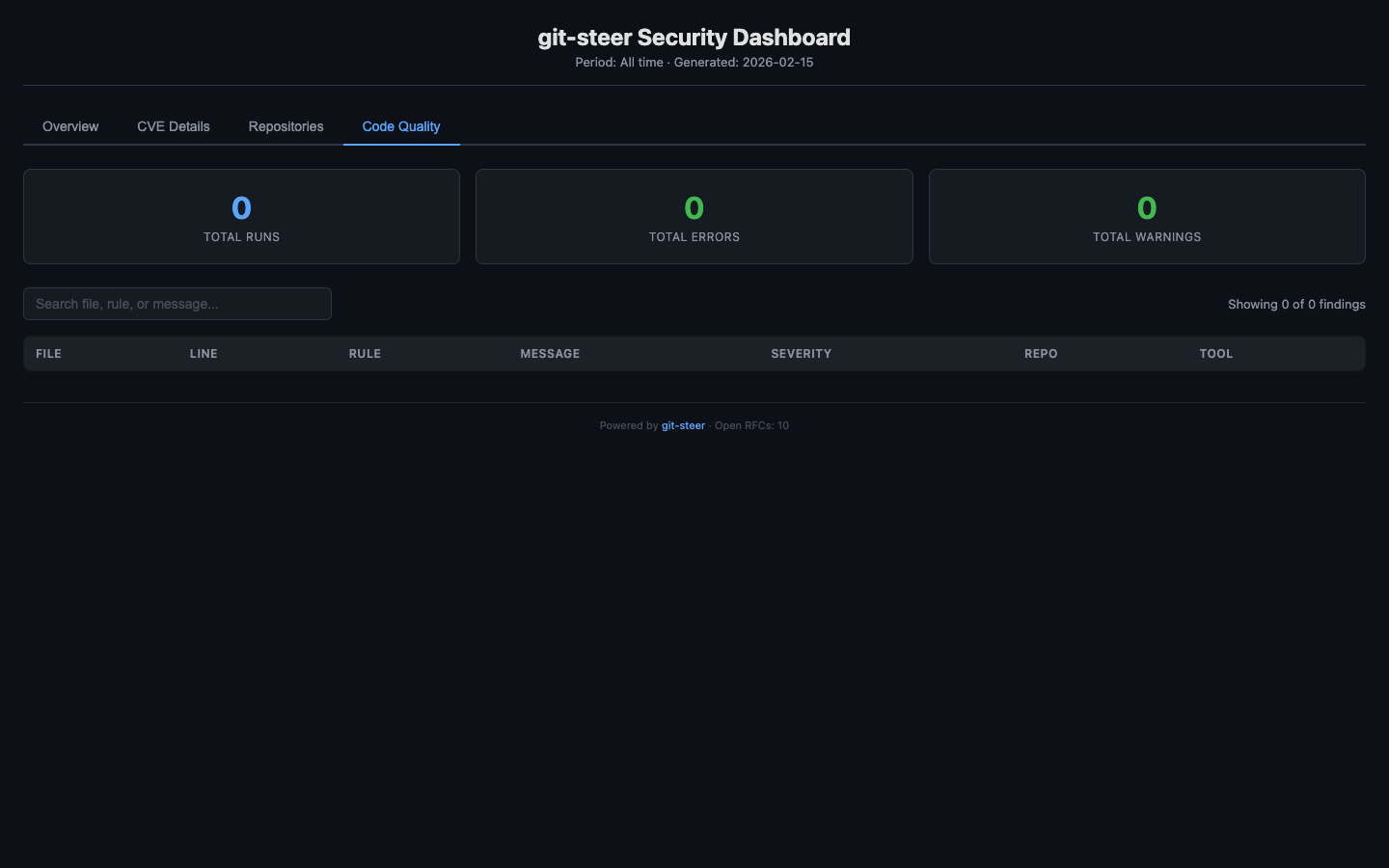
Code Quality Tab
Linter and SAST findings across all repos. Summary metric cards (total runs, errors, warnings) at the top, with a full sortable/searchable findings table below. Filter by severity to focus on what matters.
How It Works Under the Hood
The generateDashboardHtml() function builds a single JSON object containing all metrics, vulnerabilities, RFC data, and quality findings, then embeds it as:
<script>
const DATA = {
  generated: "2026-02-15T00:00Z",
  metrics: { totalCves, fixedCves, fixRate, avgMttr, bySeverity, byRepo, timeline },
  vulnerabilities: [ { cve, package, severity, fixVersion, repo, status, ... } ],
  rfcs: [ { repo, issueNumber, severity, status, vulnCount, ... } ],
  qualityFindings: [ { file, line, rule, message, severity, repo, tool } ],
  repos: { total: 35, withAlerts: 10, clean: [...] }
};
</script>
~200 lines of inline vanilla JavaScript handles tab switching, column sorting, live search, severity filtering, and repo card expansion. No React, no Vue, no build tools. Just DOM manipulation that works everywhere.
Comparison: git-steer vs ArgoCD
If you’re familiar with GitOps, you might be wondering how this compares to tools like ArgoCD. They’re philosophically related but solve different problems:
| Aspect | ArgoCD | git-steer |
|---|---|---|
| What it manages | Kubernetes clusters | GitHub itself |
| Direction | Git → K8s (pull) | Mac → GitHub API (push) |
| Source of truth | Git repos (K8s manifests) | Git repos (state + code) |
| Target | K8s resources (Deployments, Services) | GitHub resources (repos, PRs, branches) |
| Compute | Runs in-cluster (controller pod) | GitHub Actions (ephemeral) |
| Sync model | Continuous reconciliation | On-demand orchestration |
| Visibility | ArgoCD web UI | git-steer dashboard on GitHub Pages |
ArgoCD says: “Git describes what Kubernetes should look like.”
git-steer says: “Mac orchestrates what GitHub should do.”
They’re complementary—you could use git-steer to manage the Git repos that ArgoCD watches.
MCP Tools Available
git-steer exposes a comprehensive set of tools through the Model Context Protocol:
Repository Management
repo_list- List all accessible repositoriesrepo_create- Create new repo (optionally from template)repo_archive- Archive a repositoryrepo_delete- Permanently delete (requires confirmation)repo_commit- Commit files directly via API (no local clone)repo_read_file- Read file content from a reporepo_list_files- List files in a directory
Branch Operations
branch_list- List branches with staleness infobranch_protect- Apply protection rulesbranch_reap- Delete stale/merged branches
Security
security_scan- Scan repos for vulnerabilities with fix infosecurity_fix_pr- Dispatch workflow to fix vulnerabilitiessecurity_alerts- List Dependabot/code scanning alertssecurity_dismiss- Dismiss alert with reasonsecurity_digest- Summary across all managed repos
Autonomous Security Operations (v0.2.0)
security_sweep- Full autonomous pipeline: scan, create RFCs, dispatch fixes, track everythingcode_quality_sweep- Run linters/SAST via GitHub Actionsreport_generate- Generate compliance reportsdashboard_generate- Deploy interactive BI dashboard to GitHub Pages
GitHub Actions
actions_workflows- List workflowsactions_trigger- Manually trigger a workflowactions_secrets- Manage Actions secretsworkflow_status- Check status of dispatched workflows
Real-World Example: Full Security Pipeline
Here’s what an end-to-end security operation looks like with v0.2.0:
You: "Run a full security sweep across all my repos"

Claude: [calls security_sweep]
        Scanning 35 repos...
        Found 154 vulnerabilities across 10 repos
        - 127 critical
        - 27 high
        Created 10 RFC issues with CVE tables
        Dispatching fix workflows...

You: "Generate the dashboard"

Claude: [calls dashboard_generate]
        Dashboard deployed to GitHub Pages
        → https://ry-ops.github.io/git-steer-state/

You: "Show me just the critical vulnerabilities in cortex"

Claude: Open the dashboard, click the CVE Details tab,
        then click the CRITICAL filter pill.
        Or click cortex-io/cortex in the Top Riskiest
        Repositories table to jump directly to its detail view.
From zero visibility to a fully interactive security dashboard in two commands.
Why This Architecture?
1. Security
Your machine has credentials, not code. If your laptop is compromised, attackers get GitHub App credentials (revocable) but not 30 repos worth of source code, secrets in .env files, or cached credentials.
2. Portability
Everything lives in GitHub. Switch to a new Mac? Install Claude Desktop, run npx git-steer init, authenticate, done. No syncing dotfiles or cloning repos.
3. Scalability
GitHub Actions provides unlimited ephemeral compute. Need to update 100 repos? Dispatch 100 workflows. Your Mac’s CPU stays idle.
4. Auditability
Every action is logged to git-steer-state/state/audit.jsonl. Git provides history. The dashboard provides visibility. You have a complete record of every operation, who triggered it, and what changed.
5. Simplicity
No Redis. No Postgres. No Docker. Just Git and GitHub Actions. Debug with cat and jq. Understand the entire system by reading a few TypeScript files.
Getting Started
# First-time setup
npx git-steer init

# This will:
# 1. Create a GitHub App with required permissions
# 2. Install it to your account
# 3. Create a private git-steer-state repo
# 4. Store credentials in macOS Keychain

# Add to Claude Desktop config
# ~/Library/Application Support/Claude/claude_desktop_config.json
{
  "mcpServers": {
    "git-steer": {
      "command": "npx",
      "args": ["git-steer"]
    }
  }
}
Then just talk to Claude:
“Run a security sweep across all my repos” “Generate the dashboard” “Show me the compliance report” “Fix all critical vulnerabilities” “Delete all branches older than 60 days in cortex, except main”
What’s Next
This is the first post in a series about git-steer:
- This post: Introduction, architecture, and the interactive dashboard
- Setup Guide: Step-by-step installation
- Advanced Patterns: Custom workflows, multi-repo operations, extending git-steer
Conclusion
git-steer represents a shift in how we think about developer tooling:
Old model: Clone repos locally → Scan manually → Fix one by one → Repeat
New model: Describe intent → MCP orchestrates → Cloud executes → Dashboard shows results
Your local machine becomes what it should be: a thin client for orchestrating work, not a warehouse for storing code. And now, with the interactive dashboard, you get real-time visibility into the security posture of your entire GitHub organization without leaving a browser tab.
The source is open. The architecture is documented. The dashboard is live. The future is autonomous.
Repository: github.com/ry-ops/git-steer
Live Dashboard: ry-ops.github.io/git-steer-state
Stack: TypeScript, MCP SDK, GitHub API, GitHub Actions, Vanilla JS
License: MIT
Questions? Issues? PRs welcome at github.com/ry-ops/git-steer