Building a Production-Grade K3s Cluster with BGP Cross-VLAN Routing
The Challenge: Enterprise Networking in a Homelab
What happens when you want to run production-grade Kubernetes workloads in your homelab, but your services need to be accessible across multiple VLANs? You could use NodePort services, Ingress controllers, or even port forwarding. But there’s a more elegant solution that enterprise networks have been using for decades: BGP routing.
Today, I’m sharing how I built a production-ready K3s cluster with MetalLB BGP mode, enabling seamless cross-VLAN routing between my services on VLAN 145 and clients on VLAN 140. No hacks, no workarounds—just proper Layer 3 routing.
What We’re Building
This isn’t your typical K3s tutorial. We’re going full production with:
- 3-node K3s cluster (v1.33.6+k3s1) for high availability
- MetalLB in BGP mode for Layer 3 load balancing
- Cross-VLAN routing via BGP between UniFi UDM Pro and K3s nodes
- Production tooling: Velero backups, Loki logging, Linkerd service mesh, FluxCD GitOps
- Automated certificate management with cert-manager
The result? LoadBalancer services that are natively routable across your entire network, with automatic failover and dynamic route updates.
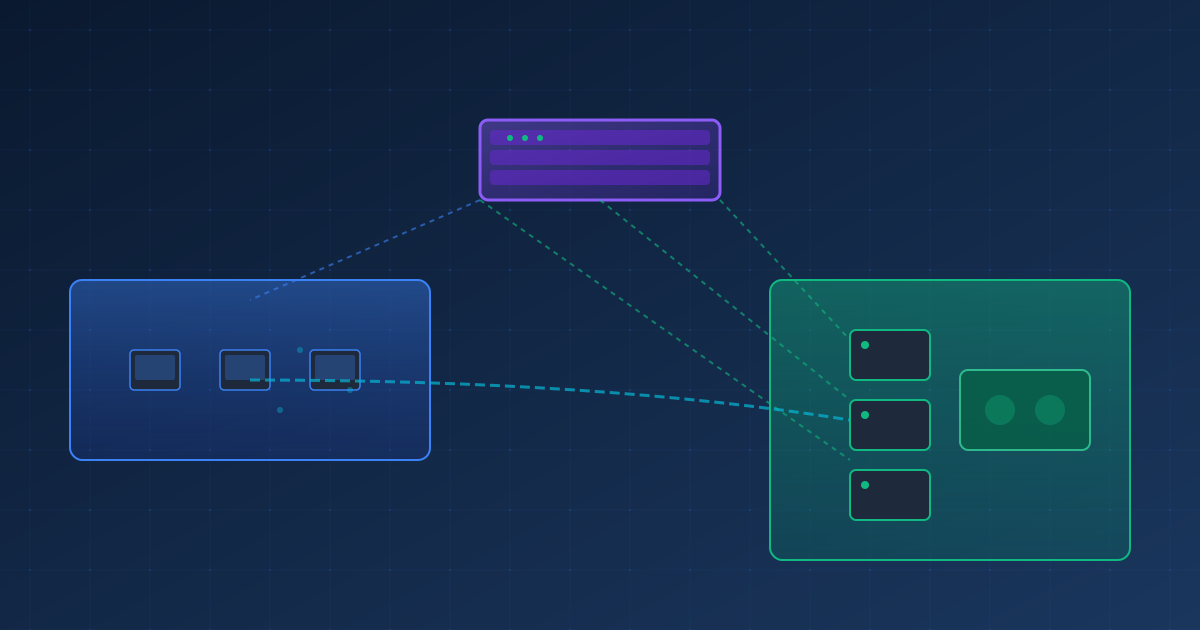
The Network Architecture
Let’s start with the topology:
┌─────────────────────────────────────────────────┐
│            UDM Pro (10.88.140.1)                │
│         BGP Router - ASN 64512                   │
│  Manages VLAN 140, 145, 150 routing             │
└───────────────┬──────────────┬──────────────────┘
                │              │
     ┌──────────┴──────┐    ┌──┴──────────────┐
     │   VLAN 140       │    │   VLAN 145       │
     │   10.88.140.0/24 │    │   10.88.145.0/24 │
     │                  │    │                  │
     │  Your Machine    │    │  K3s Cluster     │
     │  10.88.140.x     │    │  BGP AS 64513    │
     └──────────────────┘    │                  │
                             │  Master: .190    │
                             │  Worker1: .191   │
                             │  Worker2: .192   │
                             │                  │
                             │  LB Pool:        │
                             │  .200-.210       │
                             └──────────────────┘
The Key Components:
- UDM Pro: Running FRRouting as BGP router (ASN 64512)
- K3s Cluster: Three nodes on VLAN 145, each peering via BGP (ASN 64513)
- MetalLB: Advertising LoadBalancer IPs (10.88.145.200-210) to UDM Pro
- BGP Peering: Three sessions providing ECMP load balancing
Part 1: Setting Up the K3s Cluster
I started with a clean 3-node cluster on VLAN 145:
- k3s-master01: 10.88.145.190
- k3s-worker01: 10.88.145.191
- k3s-worker02: 10.88.145.192
Basic K3s installation is straightforward, but I made sure to deploy the production essentials from day one:
Production Tooling Stack
cert-manager v1.14.1 - Because manual certificate management is so 2015:
kubectl apply -f https://github.com/cert-manager/cert-manager/releases/download/v1.14.1/cert-manager.yamlVelero v1.14.1 - Backups with MinIO backend. Because disasters happen:
velero install \
  --provider aws \
  --plugins velero/velero-plugin-for-aws:v1.10.0 \
  --bucket k3s-backups \
  --backup-location-config region=minio,s3Url=http://minio.local:9000
Loki Stack - Centralized logging with Promtail + Grafana:
helm install loki grafana/loki-stack \
  --namespace loki \
  --set grafana.enabled=true
FluxCD v2.7.5 - GitOps for the win:
flux bootstrap github \
  --owner=myusername \
  --repository=k3s-fleet \
  --path=clusters/production
Linkerd edge-25.12.2 - Service mesh with mTLS everywhere:
linkerd install --crds | kubectl apply -f -
linkerd install | kubectl apply -f -
linkerd viz install | kubectl apply -f -
Part 2: MetalLB BGP Configuration
This is where it gets interesting. MetalLB can run in Layer 2 mode (ARP-based) or BGP mode. For cross-VLAN routing, BGP is the only real option.
Installing MetalLB
kubectl apply -f https://raw.githubusercontent.com/metallb/metallb/v0.14.9/config/manifests/metallb-native.yamlConfiguring the IP Pool
First, define the pool of IPs MetalLB can assign to LoadBalancer services:
apiVersion: metallb.io/v1beta1
kind: IPAddressPool
metadata:
  name: default-pool
  namespace: metallb-system
spec:
  addresses:
  - 10.88.145.200-10.88.145.210
Setting Up BGP Peers
Here’s where we configure each K3s node to peer with the UDM Pro:
apiVersion: metallb.io/v1beta2
kind: BGPPeer
metadata:
  name: udm-pro-master
  namespace: metallb-system
spec:
  myASN: 64513
  peerASN: 64512
  peerAddress: 10.88.140.1
  nodeSelectors:
  - matchLabels:
      kubernetes.io/hostname: k3s-master01
---
apiVersion: metallb.io/v1beta2
kind: BGPPeer
metadata:
  name: udm-pro-worker01
  namespace: metallb-system
spec:
  myASN: 64513
  peerASN: 64512
  peerAddress: 10.88.140.1
  nodeSelectors:
  - matchLabels:
      kubernetes.io/hostname: k3s-worker01
---
apiVersion: metallb.io/v1beta2
kind: BGPPeer
metadata:
  name: udm-pro-worker02
  namespace: metallb-system
spec:
  myASN: 64513
  peerASN: 64512
  peerAddress: 10.88.140.1
  nodeSelectors:
  - matchLabels:
      kubernetes.io/hostname: k3s-worker02
BGP Advertisement Configuration
Tell MetalLB to advertise LoadBalancer IPs via BGP:
apiVersion: metallb.io/v1beta1
kind: BGPAdvertisement
metadata:
  name: default-advertisement
  namespace: metallb-system
spec:
  ipAddressPools:
  - default-pool
Part 3: Configuring the UDM Pro as BGP Router
This is the trickiest part. UniFi devices don’t expose BGP in the UI, but they run FRRouting under the hood. We just need to enable it.
Enable BGP Daemon
SSH into the UDM Pro and edit /etc/frr/daemons:
bgpd=yesRestart FRR:
systemctl restart frrConfigure BGP
Enter the FRRouting shell:
vtyshThen configure BGP:
configure terminal

router bgp 64512
  bgp router-id 10.88.140.1

  neighbor 10.88.145.190 remote-as 64513
  neighbor 10.88.145.191 remote-as 64513
  neighbor 10.88.145.192 remote-as 64513

  address-family ipv4 unicast
    neighbor 10.88.145.190 activate
    neighbor 10.88.145.191 activate
    neighbor 10.88.145.192 activate
  exit-address-family

exit
write memory
Open the Firewall
BGP uses TCP port 179. Add iptables rules:
iptables -I INPUT -p tcp --dport 179 -s 10.88.145.190/32 -j ACCEPT
iptables -I INPUT -p tcp --dport 179 -s 10.88.145.191/32 -j ACCEPT
iptables -I INPUT -p tcp --dport 179 -s 10.88.145.192/32 -j ACCEPTImportant: These rules won’t persist across reboots. Create a boot script at /data/on_boot.d/20-bgp-firewall.sh to make them permanent.
Part 4: The Moment of Truth
Time to test if this works. Let’s deploy a simple nginx service:
apiVersion: v1
kind: Namespace
metadata:
  name: bgp-test
---
apiVersion: apps/v1
kind: Deployment
metadata:
  name: nginx-test
  namespace: bgp-test
spec:
  replicas: 2
  selector:
    matchLabels:
      app: nginx
  template:
    metadata:
      labels:
        app: nginx
    spec:
      containers:
      - name: nginx
        image: nginx:latest
        ports:
        - containerPort: 80
---
apiVersion: v1
kind: Service
metadata:
  name: nginx-lb
  namespace: bgp-test
spec:
  type: LoadBalancer
  selector:
    app: nginx
  ports:
  - port: 80
    targetPort: 80
Apply it:
kubectl apply -f test-lb.yamlCheck the service:
kubectl get svc -n bgp-test

NAME       TYPE           CLUSTER-IP      EXTERNAL-IP      PORT(S)        AGE
nginx-lb   LoadBalancer   10.43.123.45    10.88.145.201    80:30123/TCP   5s
MetalLB assigned 10.88.145.201 from our pool!
Verify BGP is Working
On the UDM Pro:
vtysh -c "show ip bgp summary"

# Output shows:
# Neighbor        V    AS MsgRcvd MsgSent   TblVer  InQ OutQ  Up/Down State/PfxRcd
# 10.88.145.190   4 64513      45      44        0    0    0 00:01:23            1
# 10.88.145.191   4 64513      45      44        0    0    0 00:01:23            1
# 10.88.145.192   4 64513      45      44        0    0    0 00:01:23            1
All three peers are Established! 🎉
Check the learned routes:
vtysh -c "show ip bgp"

# Shows:
#   Network          Next Hop            Metric LocPrf Weight Path
# * 10.88.145.201/32 10.88.145.190            0             0 64513 i
# *                  10.88.145.191            0             0 64513 i
# *>                 10.88.145.192            0             0 64513 i
The LoadBalancer IP is being advertised via BGP with ECMP across all three nodes!
The Final Test: Cross-VLAN Access
From my machine on VLAN 140:
curl http://10.88.145.201

<!DOCTYPE html>
<html>
<head>
<title>Welcome to nginx!</title>
...
It works! Traffic is flowing from VLAN 140 → UDM Pro → BGP routing → K3s VLAN 145 → Pod.
Understanding the Magic
Here’s what happens when you hit that LoadBalancer IP:
- Client Request: Your machine on VLAN 140 sends request to
10.88.145.201 - BGP Lookup: UDM Pro checks its routing table and finds BGP-learned route
- ECMP Selection: UDM Pro uses ECMP to pick one of the three K3s nodes
- L3 Forwarding: Traffic routed to chosen K3s node on VLAN 145
- MetalLB Speaker: Node’s MetalLB speaker receives traffic
- Kube-proxy: iptables/IPVS rules forward to healthy pod
- Response: Reply flows back via same BGP route
The beauty: If a node goes down, BGP automatically removes it from routing. If you add more LoadBalancer services, they’re automatically advertised. It’s completely dynamic.
Production Readiness Checklist
Here’s what’s deployed and ready:
✅ High Availability: 3-node cluster with automatic failover ✅ Backup & Recovery: Velero with MinIO backend ✅ Observability: Loki + Promtail for centralized logging ✅ Service Mesh: Linkerd for mTLS and traffic management ✅ GitOps: FluxCD for declarative cluster management ✅ Load Balancing: MetalLB BGP mode with cross-VLAN routing ✅ Certificate Management: cert-manager for TLS automation ✅ Network Security: BGP firewall rules configured
Quick Reference Commands
Check BGP Status
On K3s:
# Check MetalLB BGP peers
kubectl get bgppeer -n metallb-system
kubectl describe bgppeer -n metallb-system

# Check speaker logs
kubectl logs -n metallb-system -l component=speaker

# View LoadBalancer services
kubectl get svc -A | grep LoadBalancer
On UDM Pro:
# BGP summary
vtysh -c "show ip bgp summary"

# Learned routes
vtysh -c "show ip bgp"

# Check kernel routing table
ip route show | grep 10.88.145.2
Backup & Recovery
# Create backup
velero backup create my-backup

# Schedule daily backups
velero schedule create daily-backup --schedule="0 1 * * *"

# Restore from backup
velero restore create --from-backup my-backup
Service Mesh
# Check Linkerd status
linkerd check

# View dashboard
linkerd viz dashboard

# Inject sidecar into namespace
kubectl annotate namespace production linkerd.io/inject=enabled
Troubleshooting Tips
BGP Neighbors Stuck in Idle/Active
Check firewall: Make sure TCP port 179 is allowed from all K3s nodes to UDM Pro.
Verify bgpd is running:
pgrep -a bgpd
tail -50 /var/log/frr/bgpd.log
Check MetalLB speaker logs:
kubectl logs -n metallb-system -l component=speakerLoadBalancer IP Shows Pending
Check MetalLB controller:
kubectl logs -n metallb-system -l component=controllerVerify IP pool configuration:
kubectl get ipaddresspool -n metallb-system
kubectl describe ipaddresspool default-pool -n metallb-system
Routes Not Propagating
Force BGP refresh on UDM Pro:
vtysh -c "clear ip bgp *"Restart MetalLB speakers:
kubectl rollout restart daemonset speaker -n metallb-systemLessons Learned
-
BGP is surprisingly approachable: Don’t be intimidated by “enterprise routing protocols.” The basics are simpler than you think.
-
MetalLB BGP mode is production-ready: It’s stable, performant, and Just Works™ once configured properly.
-
UniFi + FRRouting = Hidden gem: Your UDM Pro is more capable than UniFi lets on. SSH access unlocks real power.
-
Start with the tooling: Deploying Velero, Linkerd, and monitoring from day one saves headaches later. Future you will thank you.
-
Document everything: That UDM Pro BGP config? It’s not backed up by UniFi controller. Save your vtysh commands.
What’s Next?
Now that the foundation is solid, I’m planning to:
- Deploy Prometheus + Grafana: Full metrics stack with Linkerd integration
- Configure Traefik Ingress: TLS-terminated ingress with cert-manager
- Persistent UDM Pro config: Boot script for BGP firewall rules
- Multi-cluster federation: Experiment with Kubefed for cross-cluster services
Final Thoughts
Building this cluster taught me that “production-grade” doesn’t mean “enterprise budget.” With open source tools, some networking knowledge, and a willingness to read documentation, you can build infrastructure that rivals what teams deploy in the cloud.
The real magic isn’t the technology—it’s the learning journey. Every bgppeer status check, every kubectl logs dive, every “why isn’t this working?” moment makes you a better engineer.
Status: 🟢 Production Ready
Now go build something awesome.
Resources & References
- MetalLB BGP Documentation
- K3s Production Best Practices
- FRRouting BGP Configuration
- Linkerd Service Mesh
- FluxCD GitOps
Questions? Find me on GitHub or reach out. I’m always happy to help fellow homelabbers level up their infrastructure.
Cluster Details:
- K3s Version: v1.33.6+k3s1
- Deployment Date: December 17, 2025
- Network: VLAN 145 (10.88.145.0/24)
- BGP Router: UniFi UDM Pro (10.88.140.1)